
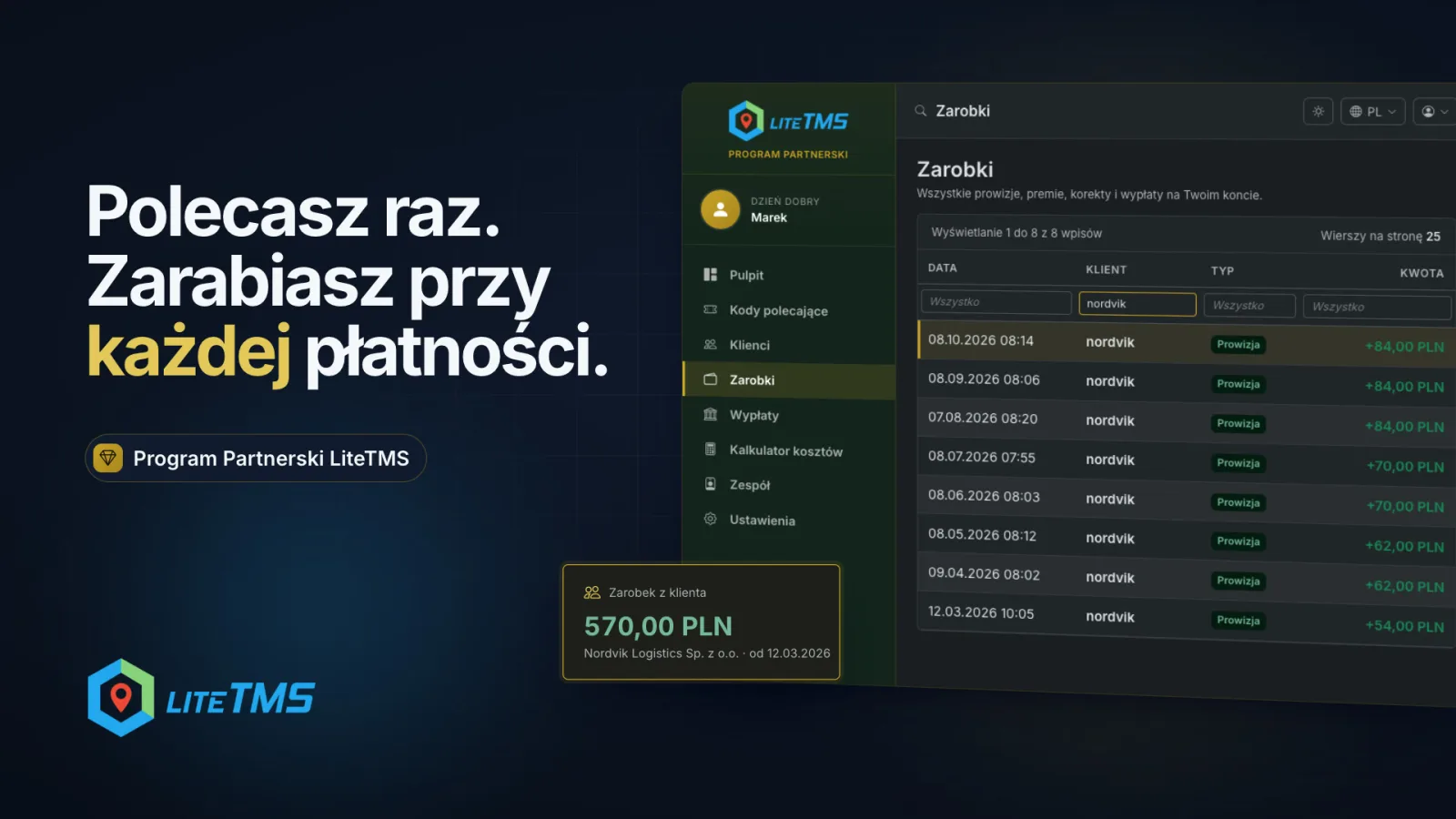
The LiteTMS Partner Program pays you a commission on every booked payment from a client you referred, not just the first one. You refer a company once, and for as long as it pays for LiteTMS and both its link to you and your partner account stay active, each new payment adds a commission to your ledger. You follow all of it in the partner portal: your referred clients, what each of them has earned you, every ledger entry and the balance you can withdraw.
The video is narrated in Polish.
Who the program is for
The program suits businesses and self-employed people who know transport from the inside: they talk to carriers, forwarders and companies running their own fleet, and they know what slows those companies down. Think sales reps, consultants, accounting firms that work with transport companies, and our existing customers who want to recommend LiteTMS to a company they know.
It is a business-to-business program and is not offered to consumers. When you recommend LiteTMS, say openly that you are our partner. Honest recommendations require it, and so do the program terms.
Your referral code, link and QR code
In the partner portal, under Referral codes, you create your own codes, for example with your name or your company's name. The portal shows how many codes you can have. Each code has a Share code button that gives you a sign-up link with your code already filled in and a QR code to download as SVG or PNG. You also choose the language of the page the recipient will see.
A company that signs up with your active code is linked to you automatically. The code can also be typed into the referral code field of the sign-up form. Each client has one referring partner, and once it signs up with your code it appears on your client list in the portal.
A commission on every payment, not only the first
Companies pay for LiteTMS in advance by topping up their account balance, by hand or automatically. Every paid, booked top-up from a client you referred writes a new commission into your ledger. If that company tops up every month, you get a new entry every month.
An example: a company referred in March tops up roughly once a month. By October your ledger holds eight commissions from that client, each with its date and amount, and more arrive with each further payment. Because every payment counts, a growing client that tops up more often or with larger amounts means more entries or larger ones in your ledger.
A few rules from the Partner Program Terms are worth knowing from day one:
- The commission is based on the payment amount excluding VAT and is recorded in the currency of that payment.
- No commission arises from a pro forma invoice, free or promotional balance, a test account or a self-referral.
- If a client gets a refund or disputes a card payment with their bank (a chargeback), the ledger shows a reversal at the original rate, never more than the commission itself.
- Commission rates and tiers are agreed individually. You see them in the partner portal or have them confirmed by email or another durable record. Your individual terms can also set a different accrual period, and where they do, they take precedence over the general terms.
The partner portal: what happens to each referral, in plain view
The Dashboard shows your available balance, lifetime earnings, number of referred clients, codes in use, payout progress and the latest ledger activity.
The Clients page lists every company that signed up with your codes: its name, workspace address, number of users (refreshed every night), referral date and the Earned from client column, which is the sum of commissions and bonuses from that company minus reversals. You do not see the client's invoices or contact details, only what is needed to settle with you.
The Earnings page is the full ledger: commissions, bonuses, reversals and payouts. Each entry has a date, client, net top-up amount, rate and amount, and you can filter by any column. A new commission appears there as soon as the client's payment is booked. This ledger is the primary statement of your commissions, so report any entry you disagree with within 30 days of it appearing.
If your clients pay in different currencies, each currency has its own balance and payout threshold in the portal. Amounts are never converted.
Request a payout with one button
When your balance in a currency reaches the payout threshold, go to Payouts and press the request button, which names the amount (for example Request 570.00 PLN payout). The request covers your whole available balance in that currency, paid by bank transfer. To be paid you need correct bank and tax details and an invoice or another document the law requires. We pay an approved, undisputed request within 30 days of receiving the complete details and document.
The request history shows the status of each payout: pending, paid or rejected. A rejection comes with a reason, and your balance stays in your account.
Cost calculator and a sales team
The Cost Calculator helps you prepare a conversation with a prospect. You set the team and fleet, modules and expected usage, and the estimated monthly and annual cost updates at once from the current price list. It is an estimate for the conversation, not an offer.
A partner registered as a company can add its sales reps under Team. Each rep signs in with their own account, and you decide whether they see all of the company's clients or only those who signed up with their codes, and whether they see the balance and earnings history. Commissions and payouts always belong to the company account.
How to become a LiteTMS partner
Fill in the short form on the partner program page and we will get in touch to discuss terms. The Partner Program Terms set out the rules, and the partnership starts when we confirm your application and send you your terms: your rates and tiers.
Questions people ask
- Is the commission paid only on a client's first payment?
- No. You earn a commission on every booked, qualifying payment from a client you referred, for as long as the client's link to you and your partner account are active. The only exception is when your individual terms expressly set a different accrual period.
- When does a new commission show up in the partner portal?
- As soon as the client's payment is booked to their balance. The entry then appears in the Earnings ledger with its date, client and amount.
- Where can I see how much one client has earned me?
- On the Clients page, in the Earned from client column. It is the sum of commissions and bonuses from that company minus reversals, shown separately for each currency.
- What are the commission rates in the LiteTMS Partner Program?
- Rates and tiers are agreed individually with each partner. You see them in the partner portal or have them confirmed by email or another durable record.
- What happens to my commission if a client gets a refund?
- The ledger shows a reversal at the original rate, never more than the commission on that payment. It can reduce future commissions in the same currency.
- How do I withdraw my partner commission?
- When your balance in a currency reaches the payout threshold, press the payout request button on the Payouts page. We transfer the whole available balance in that currency once we have your settlement details and an invoice or other required document.
Keep in touch
Make room for better reads.
Choose LiteTMS as a preferred source to find more of our articles on Google.
Choose LiteTMS on GoogleConfirm your choice on Google · Opens in a new tab