
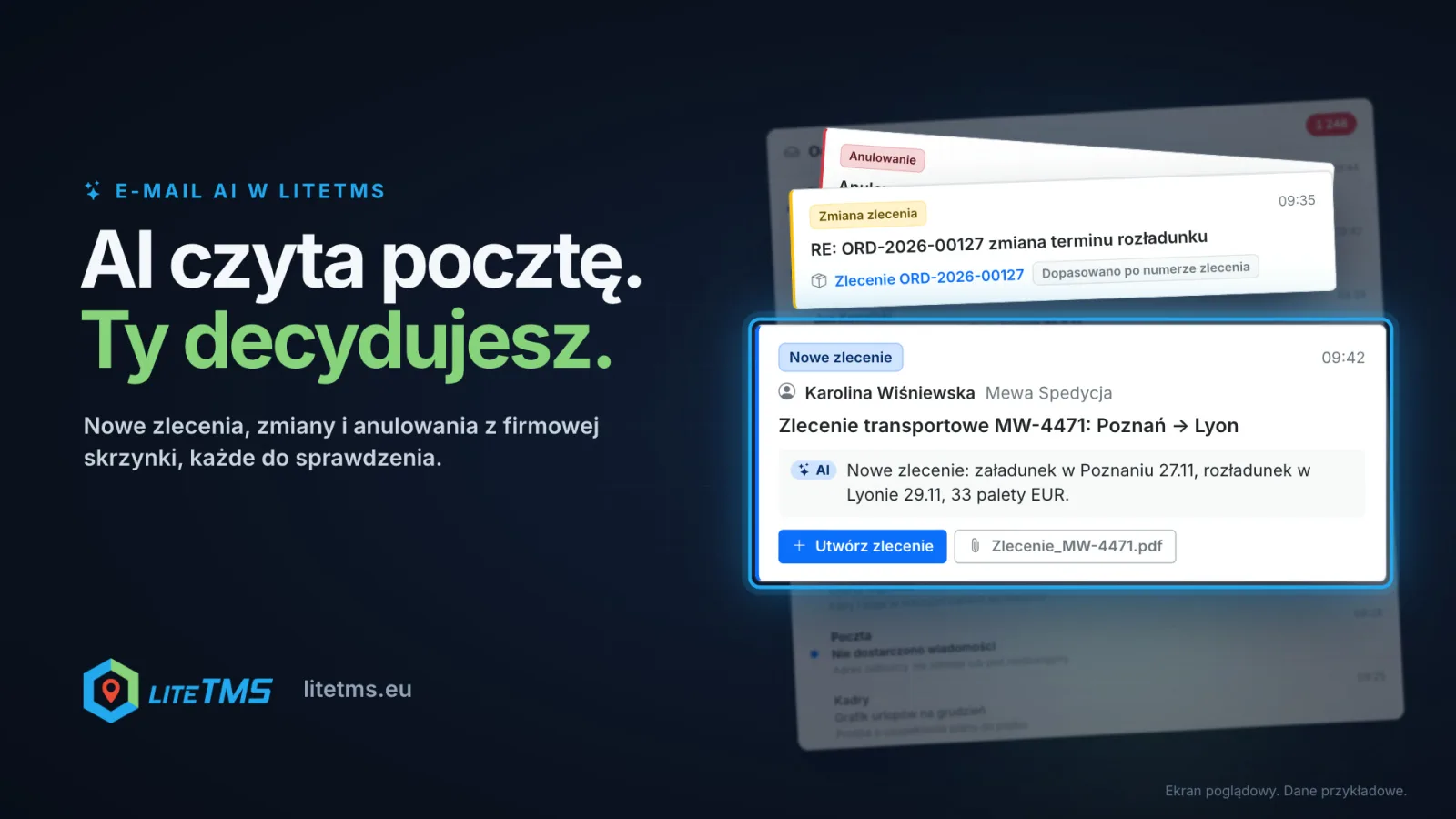
Email AI is a LiteTMS module that reads the company mailboxes you connect and looks for new transport orders, changes to orders and cancellations in the incoming mail. Each one lands on a review list with a short summary written by AI. A new order opens in the AI order import together with the email's text and attachments, a change opens in the order it belongs to, and nothing in LiteTMS changes until a person decides. The mailbox itself is only read.
Watch this film on its own page
The order is in there somewhere
Orders, changes and cancellations reach a forwarder or a carrier by email, in shared and personal mailboxes alike. They arrive between newsletters, automatic replies, fuel card statements and invoice reminders, so the one message that moves an unloading to tomorrow is easy to read too late. And once the order is found, someone still has to copy it into the TMS, field by field.
Email AI takes over the reading. It does not answer your customers and it does not create orders on its own. It finds the mail that matters, says what it is and hands it to you in the place where you act on it.
Connecting a mailbox
In Email AI, Connect a mailbox asks for the address and its password, or an app password where the mail provider requires one. LiteTMS finds the mail server of most providers by itself. When it can only guess, it shows the server it found and asks you to confirm it, and the password is sent only after that. Once Check connection succeeds, you tick the folders to read and choose where to start: new mail only, the last 7 days or the last 30 days.
Email AI only reads. It never marks a message as read and never moves, deletes or sends anything. The password is stored encrypted and is never shown again. A mailbox can be shared with the team or kept private, and each mailbox can be connected only once: a second attempt is told who connected it and when.
What happens to incoming mail
Email AI checks the connected folders every few minutes. Before AI reads anything, mail that is clearly not an order is set aside from its headers alone: newsletters and mailing lists, automatic replies, notices about undelivered mail, messages sent from the same mailbox and copies of a message it already has. The rest gets one short AI reading that decides whether it is a new order, a change, a cancellation or none of these, with a one-line summary marked AI.
Findings wait on the To review tab, newest first, with the sender, the summary, the attachments and any warnings. When AI is unsure what a message is, the card says Not sure. Mail that was set aside or found unrelated goes to Not used with its reason, so nothing disappears quietly: Read anyway sends a message to AI again.
A new order opens in the AI import
On a new order, Create order opens Create order from documents (AI) with the email's text and its attachments already added as sources. The import reads them, matches the client, places and cargo to the records you already have and prepares a draft. The order is created only after you check the draft and confirm it. The import itself is described in our post on AI order import from documents.
A change finds its order by number
For a change or a cancellation, LiteTMS looks for the order by the number, the order reference or the client's reference quoted in the email. This matching is plain code, not AI, and the card says what matched, for example "Matched by order number". When several orders fit, you pick the right one; when none does, you search for it.
Review change opens that order with its Client's changes dialog already holding the email. AI compares it with the order and lists each change, such as a new unloading date and time, and you tick what goes in before you press Apply changes. A cancellation is only pointed at: Email AI links the order and leaves the cancellation itself to you.
Mail written to fool the AI
Email comes from outside your company, so Email AI treats it as data, never as instructions. Text hidden from a human reader is removed before AI sees the message, the AI works from a fixed instruction that no email can change, and its answer is checked again in code. When a message contains text that tries to give AI instructions, its card carries a red warning saying that nothing was done because of it.
The card also warns when the receiving mail server could not confirm the sender, which can mean a forged message. On a change or a cancellation it says to check the request with the customer before changing the order. A warning never hides a message: you always see it, and you decide.
Team work, limits and storage
What a shared mailbox finds is visible to the roles allowed to work with Email AI. A private mailbox is seen only by the person who connected it and by roles that manage every mailbox. When someone takes a finding, a colleague who opens it next is told who already took care of it, so the same order is not entered twice. New findings also show up as a notice under the bell.
Each mailbox has a daily AI reading limit, 500 messages unless you change it. On top of that, AI reads at most 20 messages a day from one sender and 60 from one sender domain per mailbox, except senders saved as contractor contacts, and 3,000 a day across the whole company. Anything above a limit waits for the next day, and the mailbox page says why. The text and attachments Email AI stores are deleted 90 days after the mail arrived; orders you created stay.
How to switch it on
Email AI is a paid module in the LiteTMS module marketplace with a 7-day free trial, and its monthly price is shown there before you switch it on. If you do not cancel during the trial, the first month is charged when it ends. Reading mail with AI is billed like any other AI use in LiteTMS, and so is an AI import you open from a finding. An administrator activates the module; roles that create orders get access to it on the first activation, and anyone with the right permission can connect a mailbox.
Not using LiteTMS yet? Get in touch and tell us which mailbox your orders arrive in.
Questions people ask
- Does Email AI change anything in my mailbox?
- No. It only reads the folders you choose. It never marks a message as read and never moves, deletes or sends anything.
- Which mailboxes can I connect to Email AI?
- Mailboxes that sign in with a password or an app password. Gmail and Google Workspace need an app password.
- Does Email AI create orders by itself?
- No. It finds new orders, changes and cancellations and puts them on a review list. An order is created only when a person checks the AI import draft and confirms it, and a change goes in only when a person applies it.
- What happens if AI misses an order email?
- Every message that was set aside or found unrelated is listed on the Not used tab with its reason. Read anyway sends it to AI again.
- Can an email trick the AI into changing an order?
- The AI cannot change an order at all: every result is a suggestion that waits for a person. A message that tries to give AI instructions gets a red warning on its card, and nothing is done because of it.
- How much does Email AI cost?
- It is a paid module with a 7-day free trial, and its monthly price is shown in the module marketplace before you switch it on. Reading mail with AI is billed as AI usage.
Keep in touch
Make room for better reads.
Choose LiteTMS as a preferred source to find more of our articles on Google.
Choose LiteTMS on GoogleConfirm your choice on Google · Opens in a new tab