
Feature list
What LiteTMS does
The features LiteTMS has today, grouped by the work they help with. Optional modules and services billed per use are marked, so you can tell what your own setup would include.
- Features
- 49
- Areas
- 7
- Last addition
- Optional module Switched on per company and priced on its own. Some modules start with a trial.
- Billed per use A paid service, charged when you use it at the rate shown in your panel.
Orders and planning
From the first document to the plan for the week: where an order lives and how the office decides who drives it.
-
One workspace per order
Each transport order has its own page with the route and stops, the assigned vehicles and drivers, activity, documents, messages and finances. Your team can see what has happened on a job and what is still missing.
Details: One workspace per order
- Route stops with time windows, cargo and notes for the driver
- An activity feed with statuses, documents and alerts in time order
- Change a field on the order page itself, without opening a form
Read the full story: One workspace per order Copy the link to this feature
-
AI order import from documents
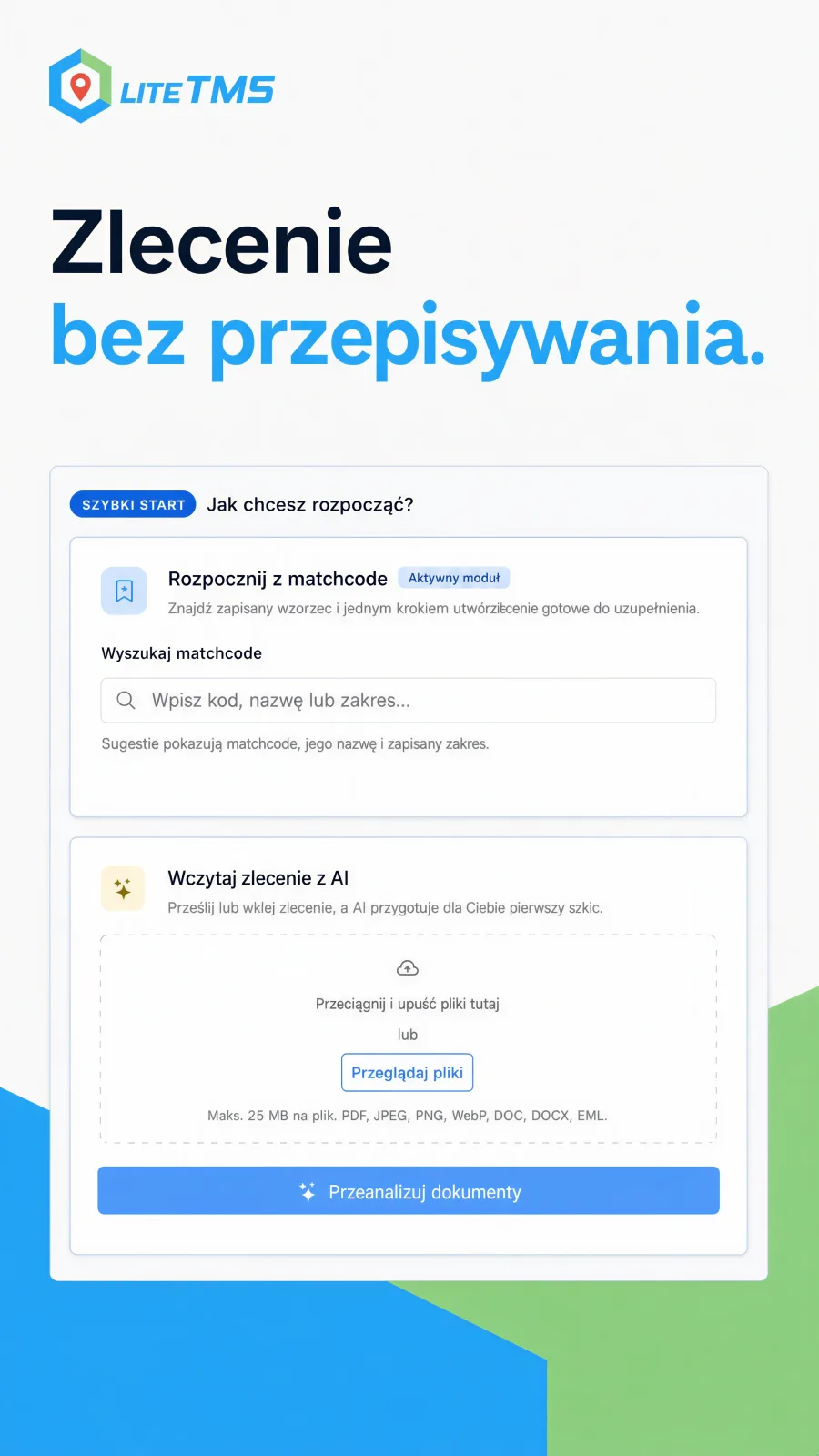
Upload a PDF, scan, Word file or email and LiteTMS prepares an order draft, matches it to the contractors, places and vehicles you already have, and shows what to check. The order is created only after you confirm it.
Details: AI order import from documents
 Enlarge the image
- Up to eight files become one order draft
- A review screen lists what was read and what still needs your attention
- Each import is billed as AI usage
Added Read the full story: AI order import from documents Copy the link to this feature
-
Orders calendar
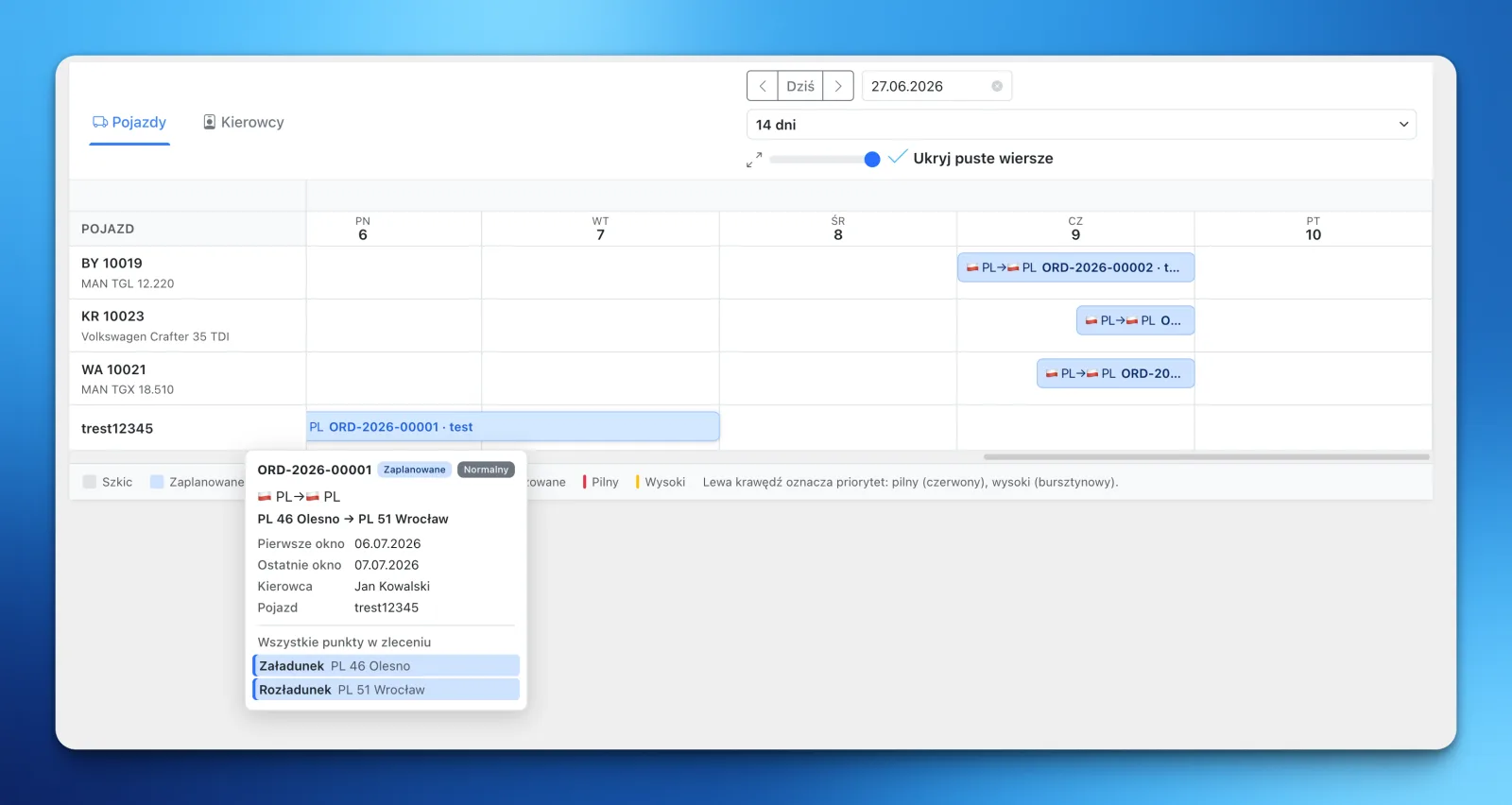
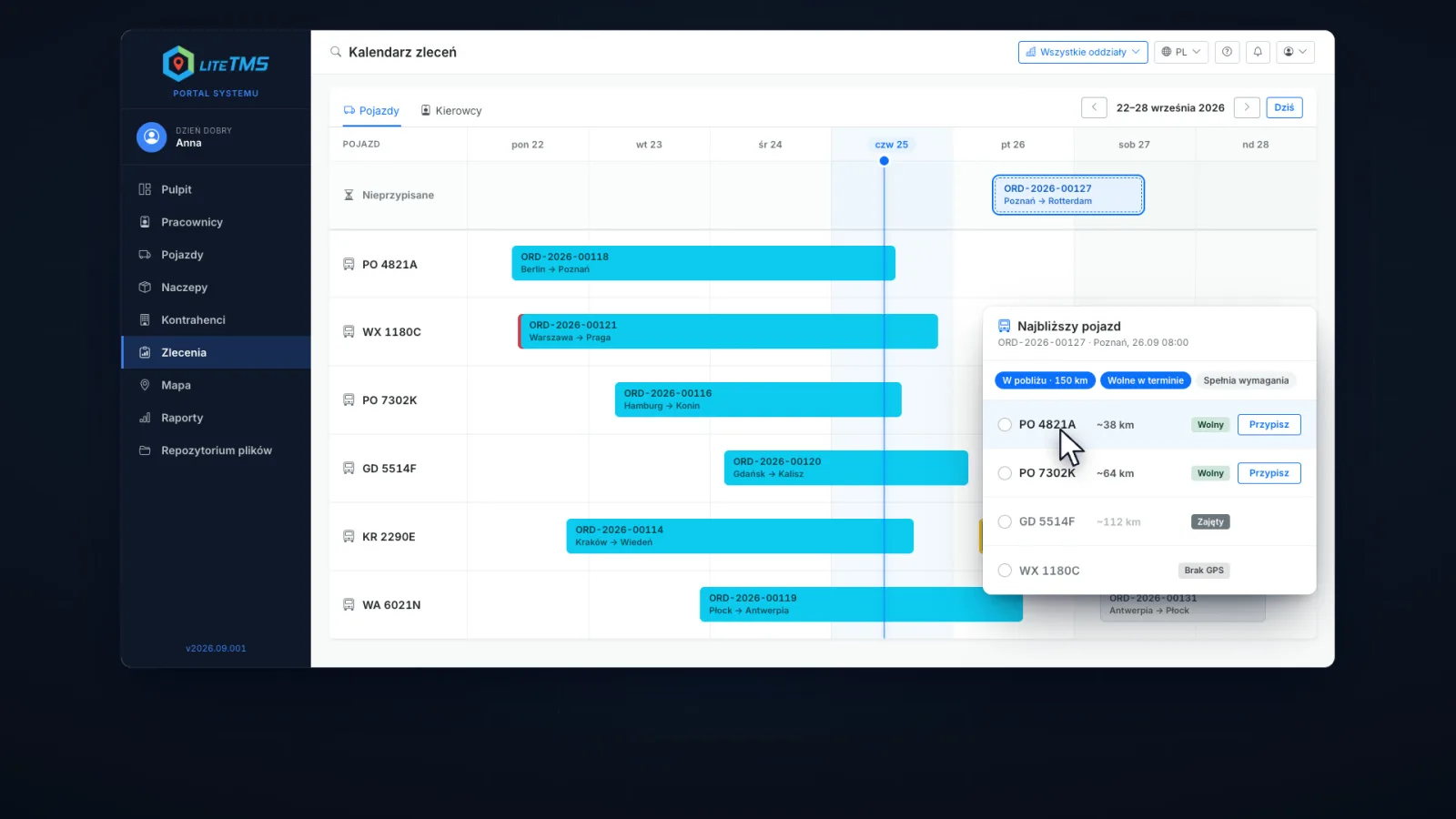
A timeline with one row per vehicle or driver and one bar per order shows the shape of the week: what is on the road on Thursday and which truck comes free on Friday.
Details: Orders calendar
 Enlarge the image
- Switch the rows between vehicles and drivers
- An order card shows its time windows, crew and stops
- One click opens the route and the latest known position of the truck
Added Read the full story: Orders calendar Copy the link to this feature
-
Nearest free vehicle
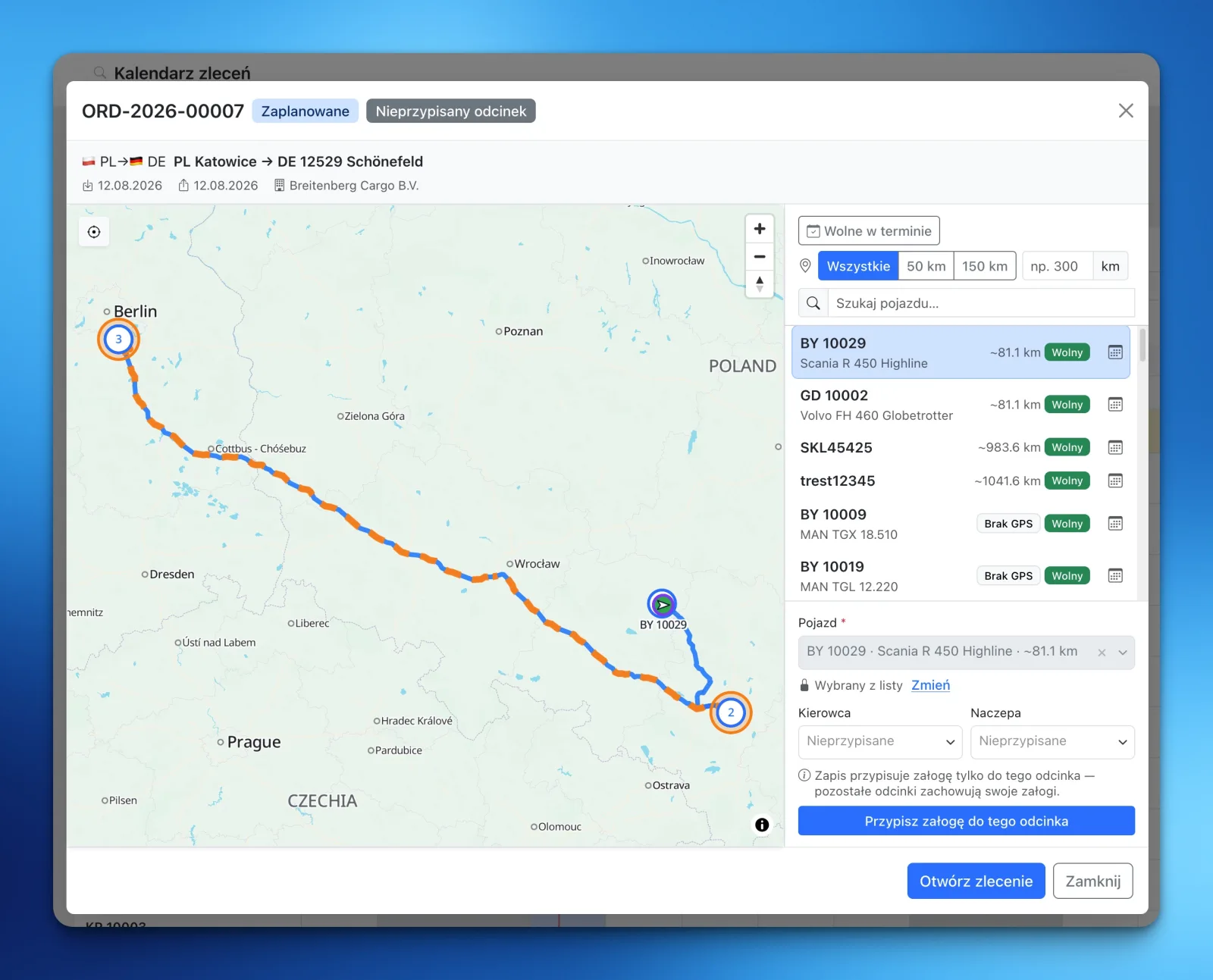
For an unassigned order, LiteTMS ranks vehicles by their approximate distance from the first stop, checks whether each is free in the order's time window and shows its schedule. You assign the vehicle, driver and trailer in the same view.
Details: Nearest free vehicle
 Enlarge the image
- Free means no overlapping active assignment
- Show the whole fleet or only vehicles within a radius you choose
- A vehicle without a GPS position stays on the list, clearly marked
Added Read the full story: Nearest free vehicle Copy the link to this feature
-
Orders map
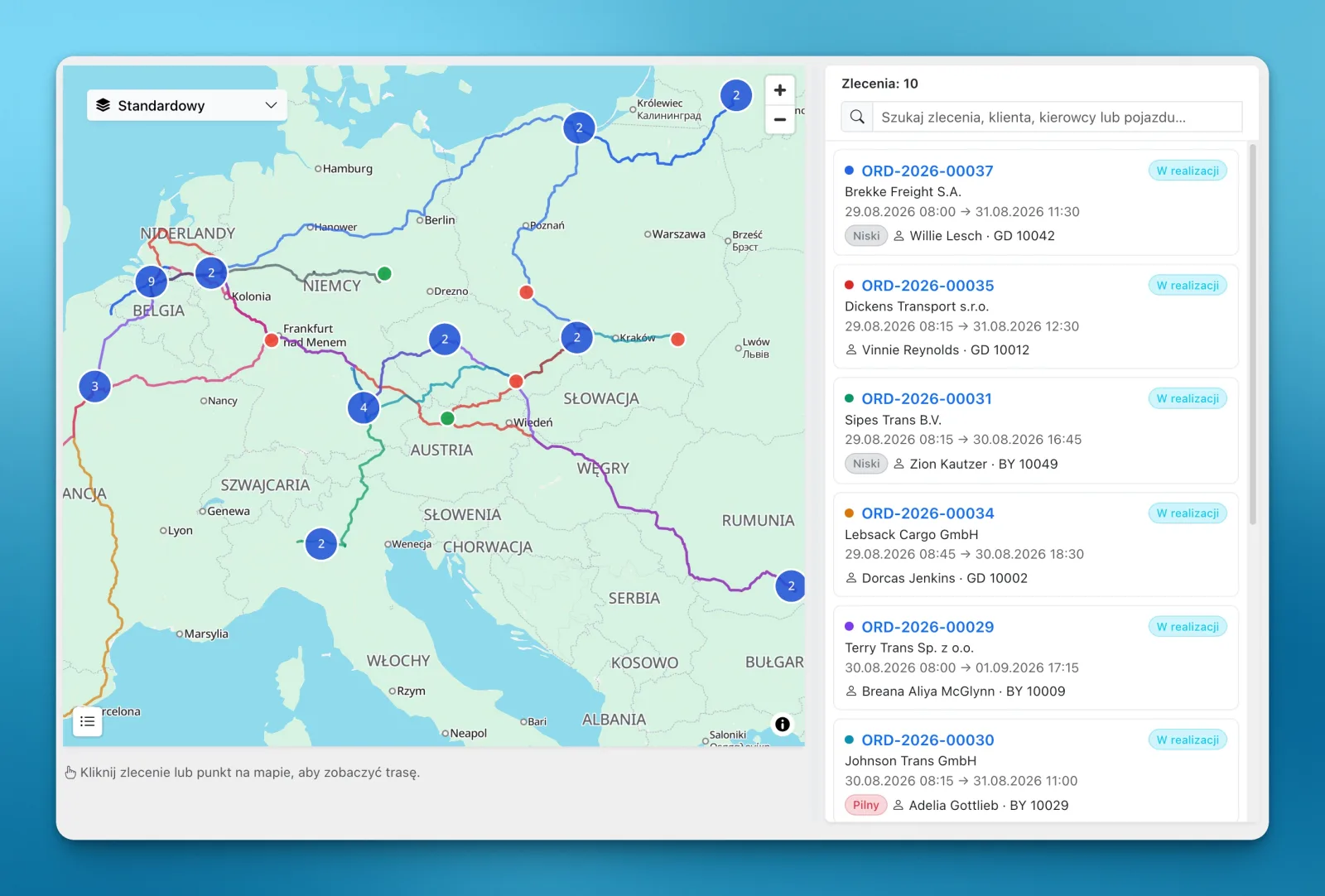
Orders, stops and routes from a chosen day, week or month on one map, with a searchable order list beside it. You see where the work is going without opening each order.
Details: Orders map
 Enlarge the image
- Filter by status or search the list
- Select an order to see its stops in sequence
- Assign an unassigned order straight from the map
Added Read the full story: Orders map Copy the link to this feature
-
Truck route planning with breaks
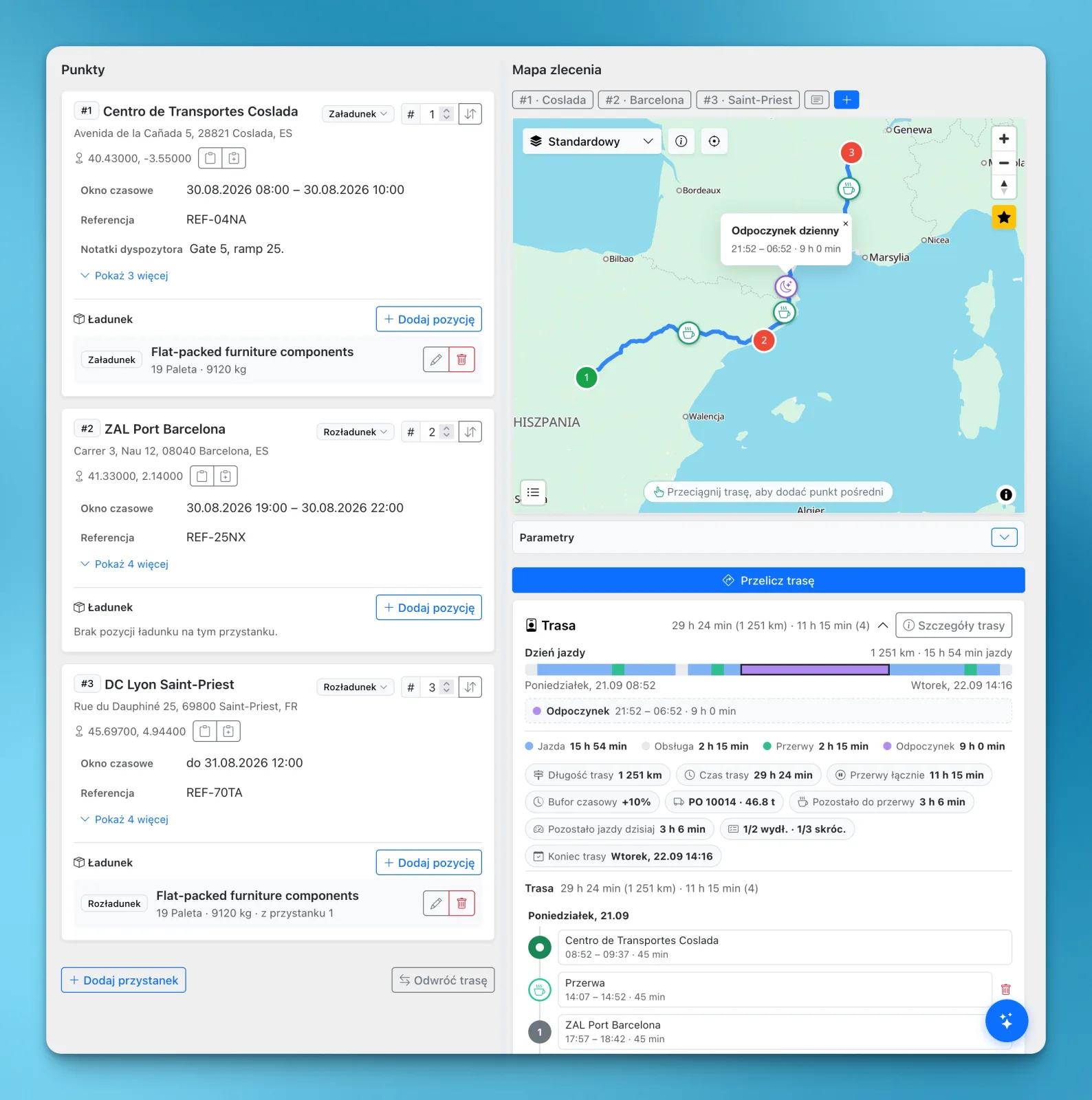
Plan an order's route for the truck you are sending: distance, driving time and toll estimates per country, plus the driver's breaks and rests under the EU rules, so the arrival time accounts for the whole working day.
Details: Truck route planning with breaks
 Enlarge the image
- The vehicle's dimensions and weight are part of the calculation
- These are estimates that depend on road data and on what you enter, not a guarantee of arrival
- Routing is a service billed per use
Added Read the full story: Truck route planning with breaks Copy the link to this feature
-
Transport orders for carriers
When a subcontractor carries the job, you issue them a transport order from the order itself: the route, the cargo and your terms in one numbered PDF, printed in the language you choose.
Details: Transport orders for carriers
- Your own clauses, kept in one place and reused
- An issued order keeps the route and terms it was issued with
- Sending it by email uses the Email module
-
Share an order by link
Send a customer or partner a link to an order and choose what it shows: which stops, which details and which documents. The link can expire, and you can switch it off.
Details: Share an order by link
- A step-by-step dialog with a document picker
- A list of every link created for the order
-
Order templates
Save a real order as a template with its route, cargo, crew, documents, alerts and price, then create the next similar order from it.
Details: Order templates
- Update the template when the details change
- Duplicate a single order without saving a template
-
Order export to CSV, Excel and XML
Turn orders into files another program can import, one order or a whole batch at once. Build the file layout yourself or start from a ready-made template.
Details: Order export to CSV, Excel and XML
- Columns or an XML tree, built without code, with a live preview
- Every download is recorded with its order
-
3D load planning
See how the cargo will fit before loading starts. Arrange it in a vehicle, trailer or sea container in 3D, check space and axle loads, then create a PDF for the driver straight from the order.
Details: 3D load planning
- Needs accurate dimensions and weights
- A planning aid, not a guarantee of safe or compliant loading
-
Last-mile delivery planning
Plan the deliveries of an order with many stops. Choose the vehicles and what matters most, and LiteTMS builds the routes, accounting for traffic, and sends them to the drivers.
Details: Last-mile delivery planning
- Set the longest working time of a tour
- Planning uses routing services billed per use
Drivers and LiteTMS Mobile
What drivers and office staff do in the phone app: report progress, send proof, follow the plan and talk to the office.
-
One-tap status updates
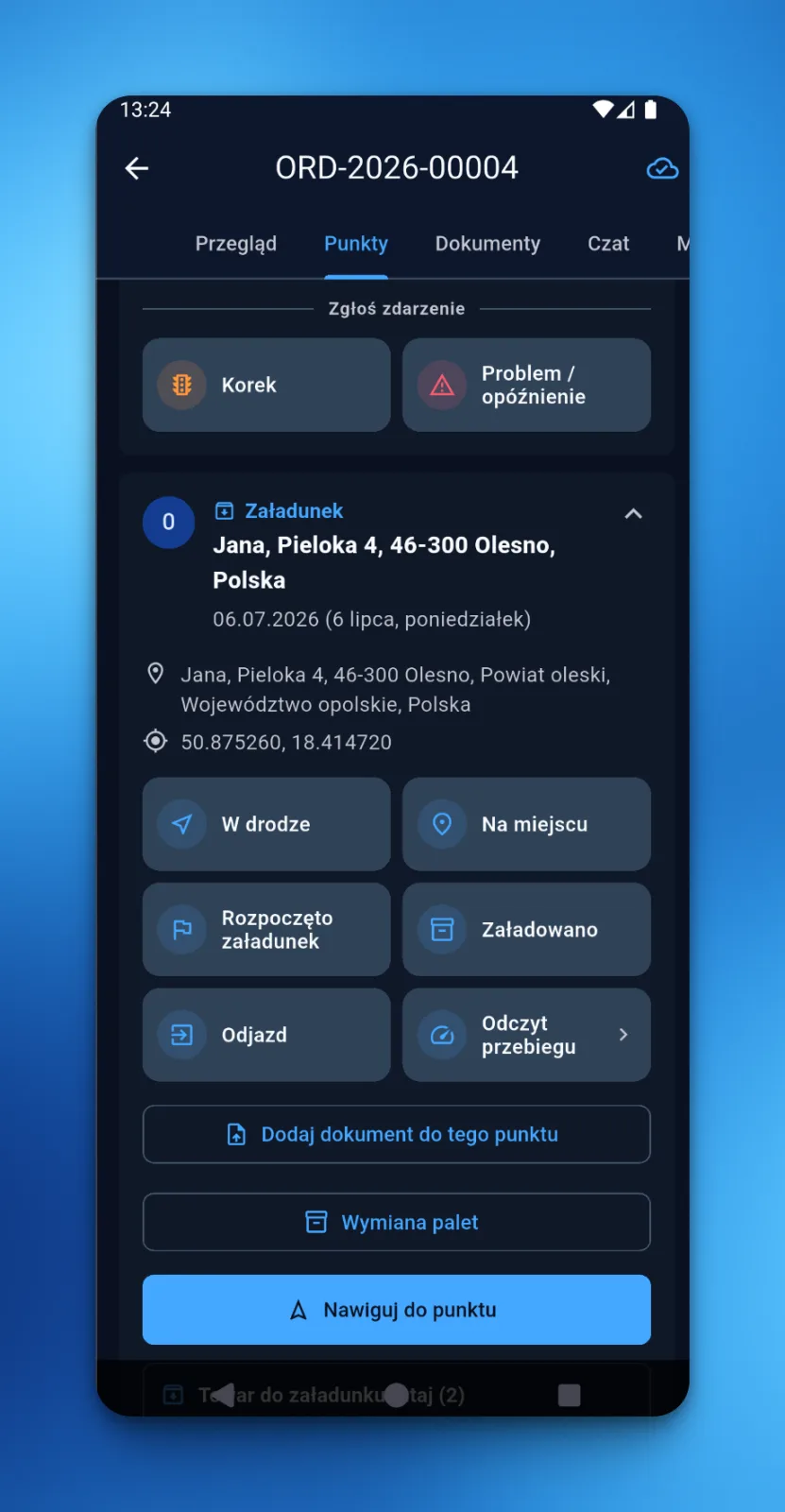
The driver reports each step of a stop in LiteTMS Mobile with one tap: on the way, on site, loading started, loaded, departure. The status is recorded on the order in the office once the phone sends it.
Details: One-tap status updates
 Enlarge the image
- The app offers the statuses that fit the stop
- Without signal the status waits on the phone and is sent after the connection returns
- A status has no charge of its own
Added Read the full story: One-tap status updates Copy the link to this feature
-
Photo and signature tasks at a stop
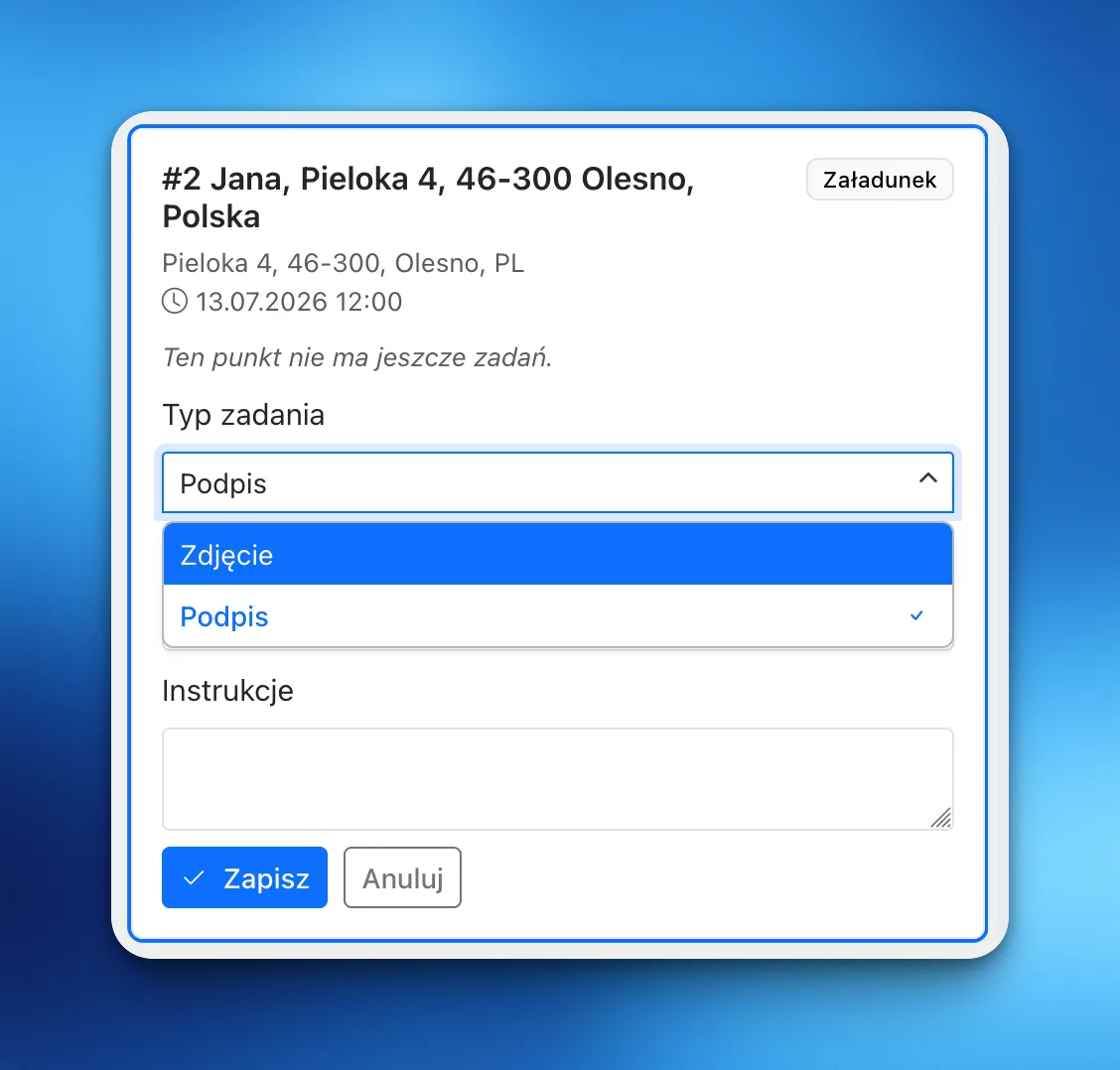
A dispatcher attaches a task to any stop on the route, such as a photo of the cargo or the receiver's signature. The driver completes it in LiteTMS Mobile at that stop, and the proof appears on the order once the phone has sent it.
Details: Photo and signature tasks at a stop
 Enlarge the image
- The receiver signs directly on the driver's screen
- Photos and signatures taken without signal are sent after the connection returns
- Stored files follow the storage pricing shown in the panel
Added Read the full story: Photo and signature tasks at a stop Copy the link to this feature
-
Documents straight from the cab
The driver photographs a CMR or another document in LiteTMS Mobile and files it under the right category. It is stored with the order, with the time and, when available, the location.
Details: Documents straight from the cab
- Your company's document categories appear in the app
- A photo taken without signal waits on the phone and is sent after the connection returns
-
The planned route in the driver's app
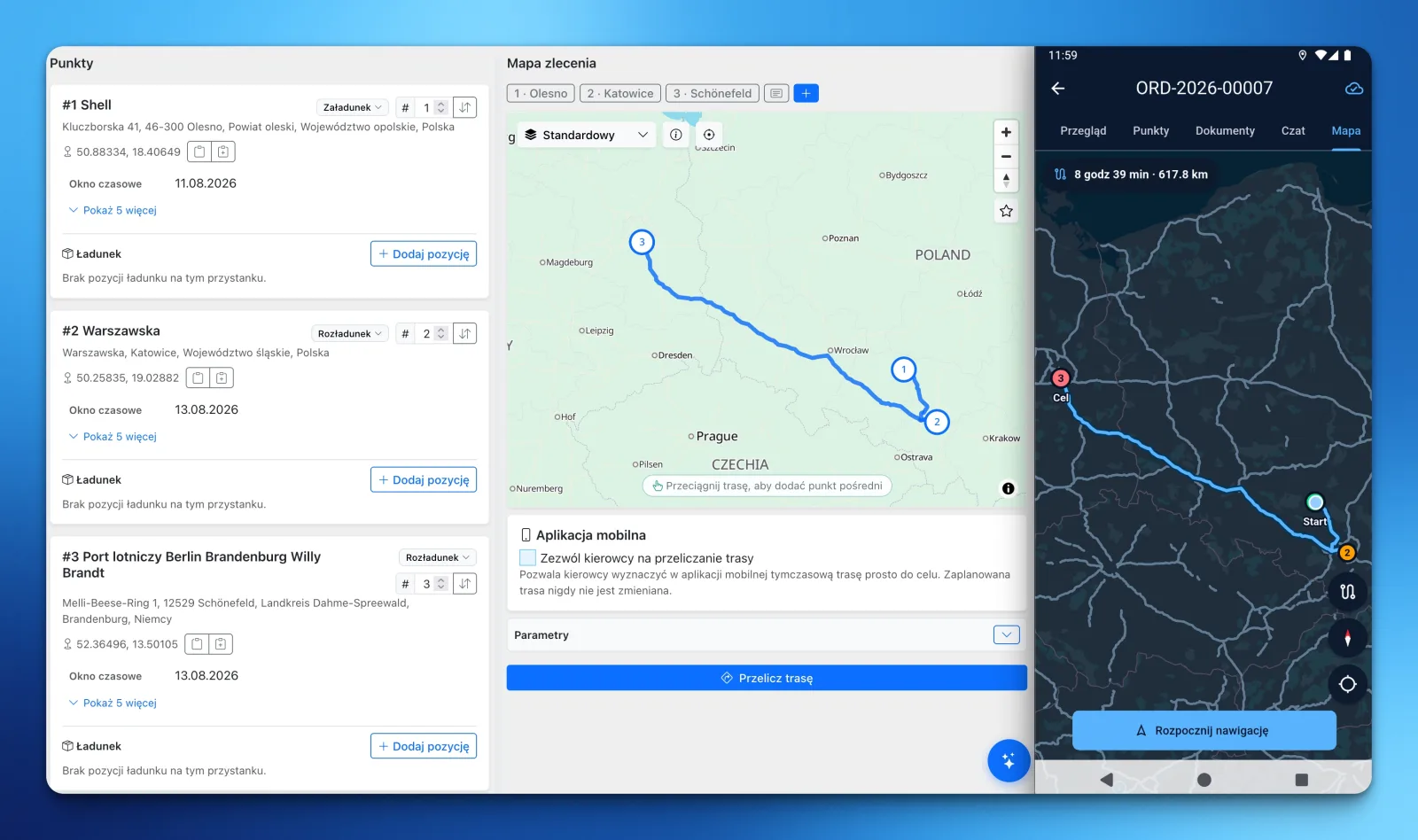
The road line and stop order the office saves for an order are what the assigned driver sees in LiteTMS Mobile, with navigation along that plan. Nobody rebuilds the route from a phone call or a screenshot.
Details: The planned route in the driver's app
 Enlarge the image
- A driver assigned to selected legs sees those sections of the plan
- A route the office changes reaches the phone at the next synchronization
- A driver's own recalculation never overwrites the office plan
Added Read the full story: The planned route in the driver's app Copy the link to this feature
-
Country maps downloaded to the phone
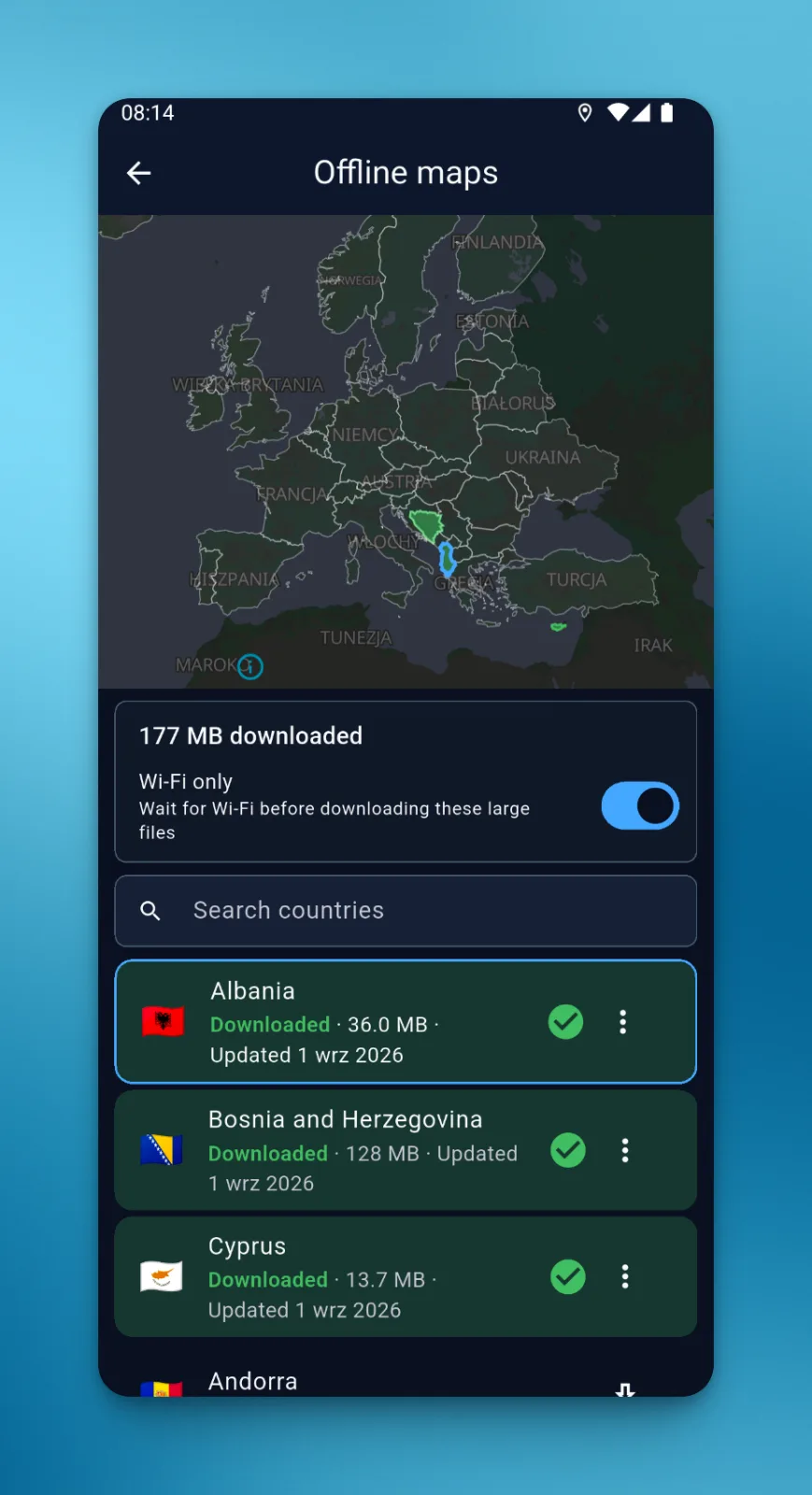
Drivers download country maps in LiteTMS Mobile before departure and can still view the downloaded area when mobile coverage drops.
Details: Country maps downloaded to the phone
 Enlarge the image
- Pick a country from the map or from a list
- A downloaded map is for viewing: recalculating a route or searching an address needs a connection
Added Read the full story: Country maps downloaded to the phone Copy the link to this feature
-
Face-to-face translator
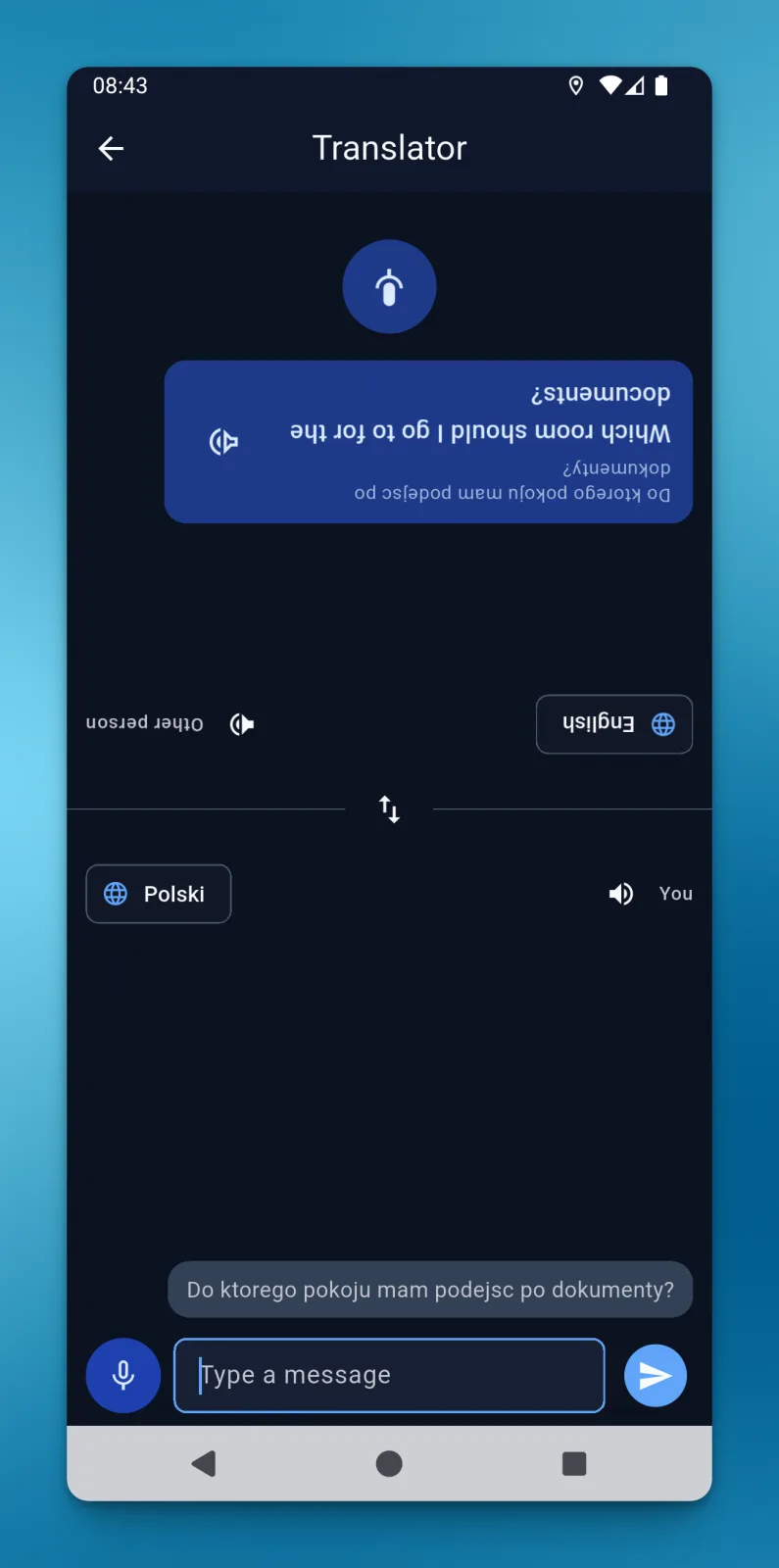
When a driver and a warehouse worker share no language, the driver types or records a message and the translation appears on the other half of the screen, turned so the person opposite can read it.
Details: Face-to-face translator
 Enlarge the image
- The other person replies by voice on their half of the screen
- A translation can be read aloud when voice playback is enabled for the driver
- Translation and speech are services billed per use
Added Read the full story: Face-to-face translator Copy the link to this feature
-
Driver chats on the dispatcher's phone
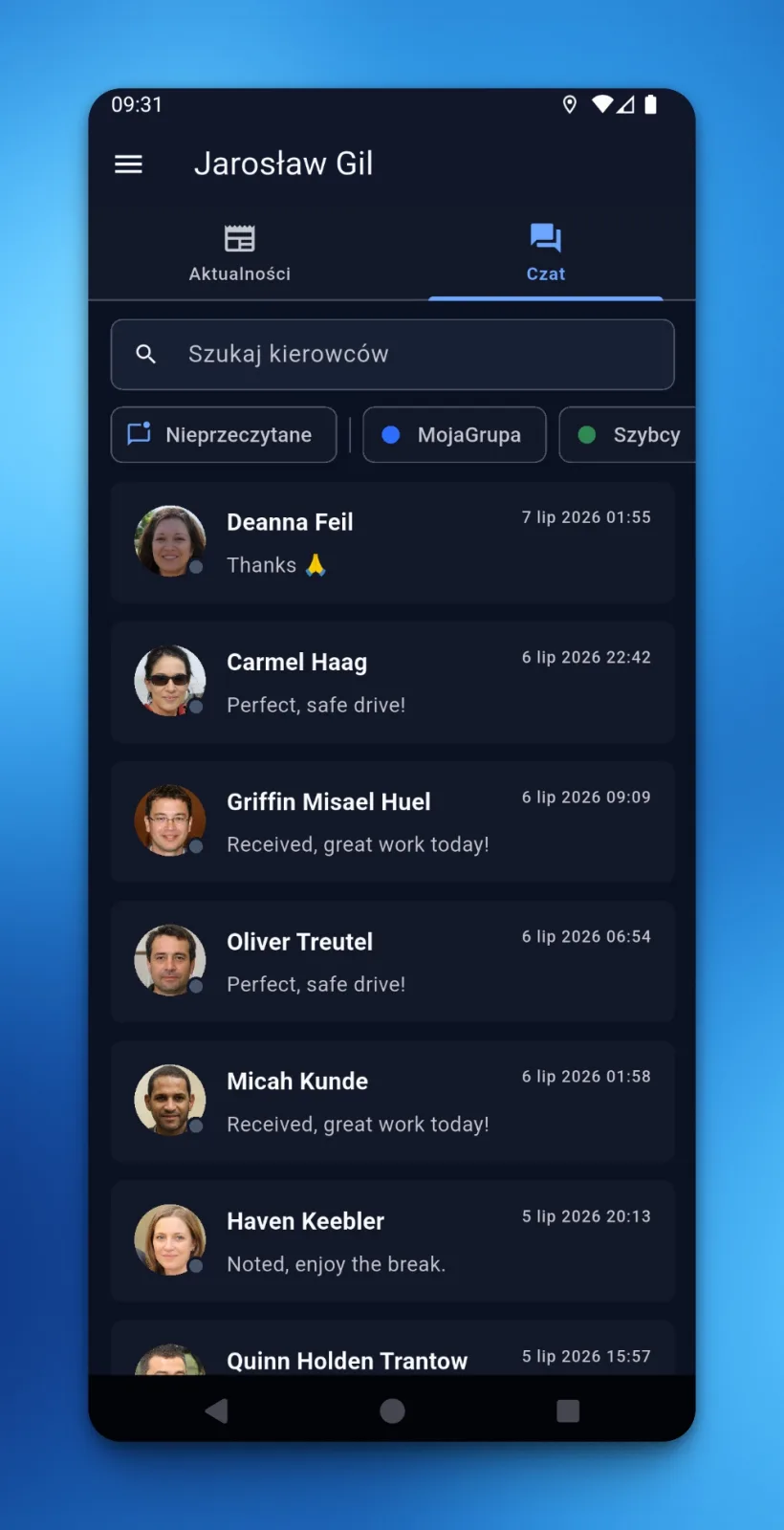
Office users get their driver conversations in LiteTMS Mobile: a searchable directory with unread counters, driver-group filters and push alerts for new messages when notifications are enabled.
Details: Driver chats on the dispatcher's phone
 Enlarge the image
- A reply lands in the same company thread the office uses
- Muted threads and the chosen driver groups decide which alerts arrive
Added Read the full story: Driver chats on the dispatcher's phone Copy the link to this feature
-
Location with an update, tracking by choice
A status or a document sent from LiteTMS Mobile can carry the phone's position at that moment. A separate, optional mode sends positions during a journey when the company allows it and the driver turns it on.
Details: Location with an update, tracking by choice
- Tracking needs a selected vehicle and the phone's location permission
- Positions from the phone appear on the fleet map like positions from a GPS device
Fleet, map and alerts
The people, vehicles and trailers behind every order, where the trucks are, and what should reach you without watching a map.
-
Employees, vehicles, trailers and contractors
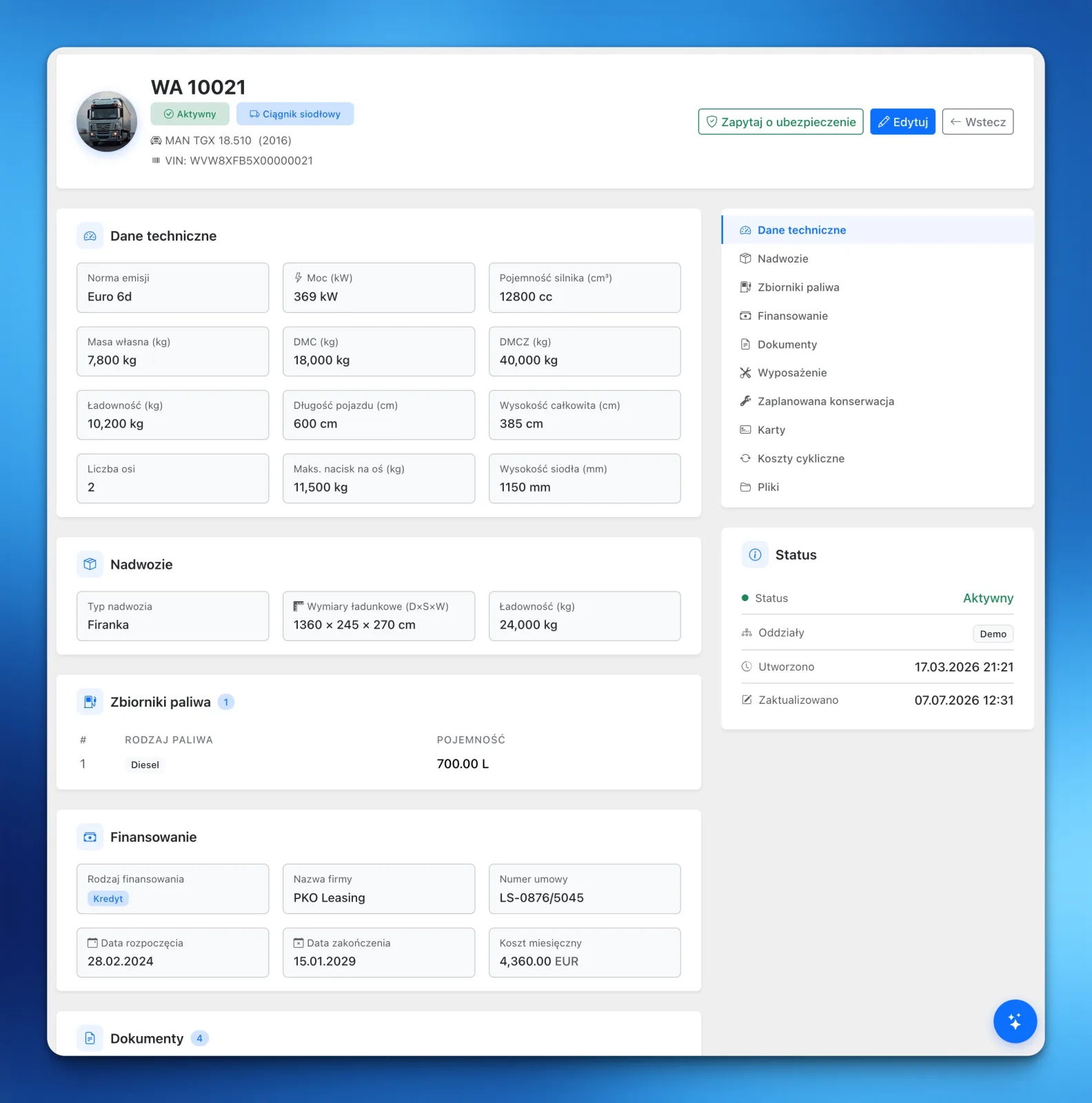
Four registers hold the records of the people, equipment and companies that everyday work depends on. Each record leads to the details and documents of that person, asset or company.
Details: Employees, vehicles, trailers and contractors
 Enlarge the image
- Contractors have no fee per record
- Employees, vehicles and trailers are billable resources, counted by the rules shown in your panel
- Existing records can be imported from a CSV or XLSX file
Read the full story: Employees, vehicles, trailers and contractors Copy the link to this feature
-
Fleet map
One map shows the latest available position of each vehicle, from a supported GPS provider or from LiteTMS Mobile, together with the time of that position.
Details: Fleet map
- GPS providers are connected in settings, and you can ask us about yours
- Map styles made for transport work, including truck restrictions
- A live traffic layer, billed as a map service
-
Geofencing: zone entry and exit alerts
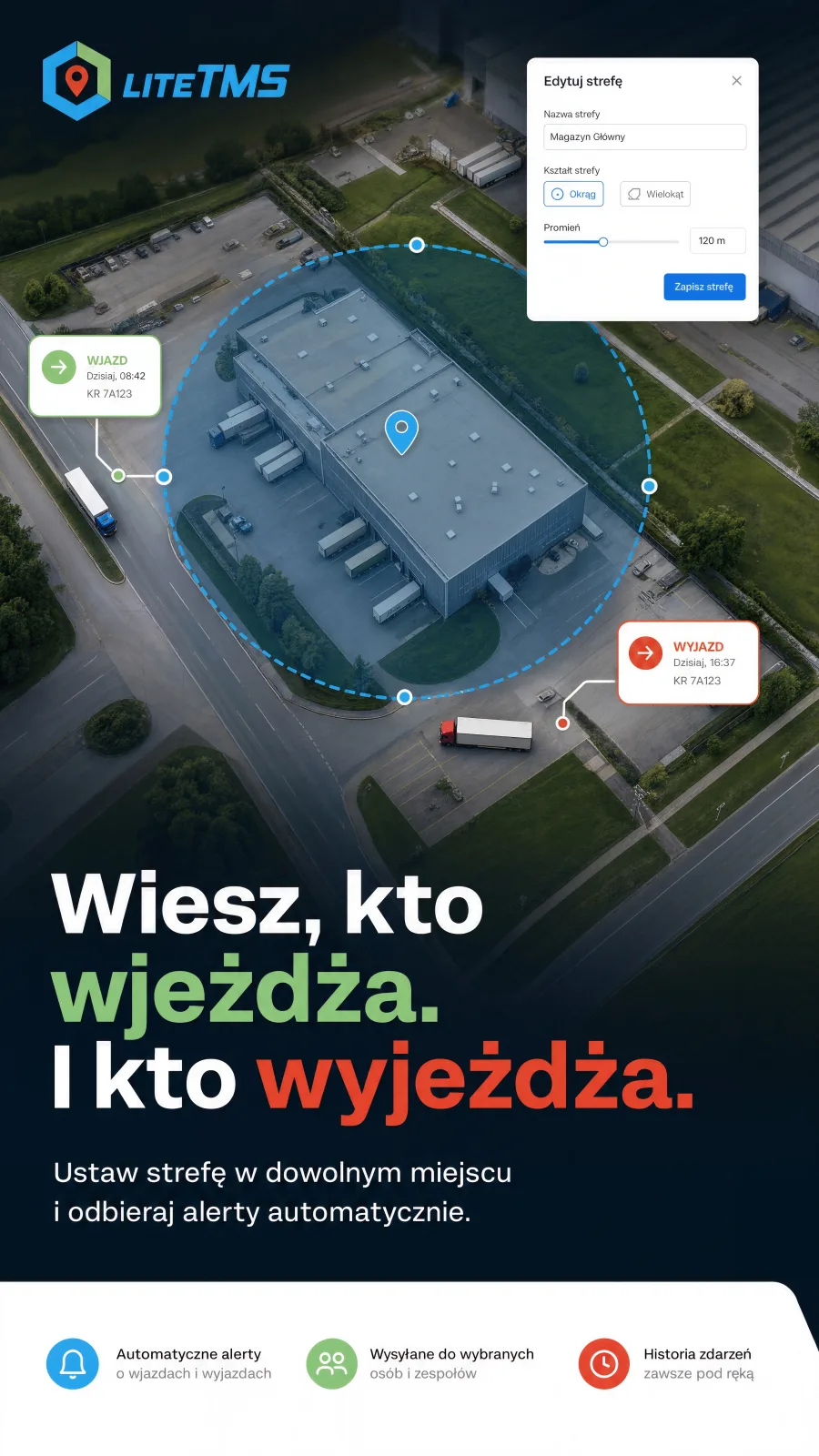
Mark a customer site, a depot or a restricted area on the map and get an SMS, an email or an in-app alert when a vehicle with live GPS enters or leaves it.
Details: Geofencing: zone entry and exit alerts
 Enlarge the image
- A zone is a circle or a polygon, and a rule covers all vehicles or the ones you select
- Positions are checked about once a minute, so an alert arrives a few minutes after the crossing
- Every crossing stays in the history, also while alerts are muted
- SMS and email alerts are billed per message
Added Read the full story: Geofencing: zone entry and exit alerts Copy the link to this feature
-
Route corridor alerts
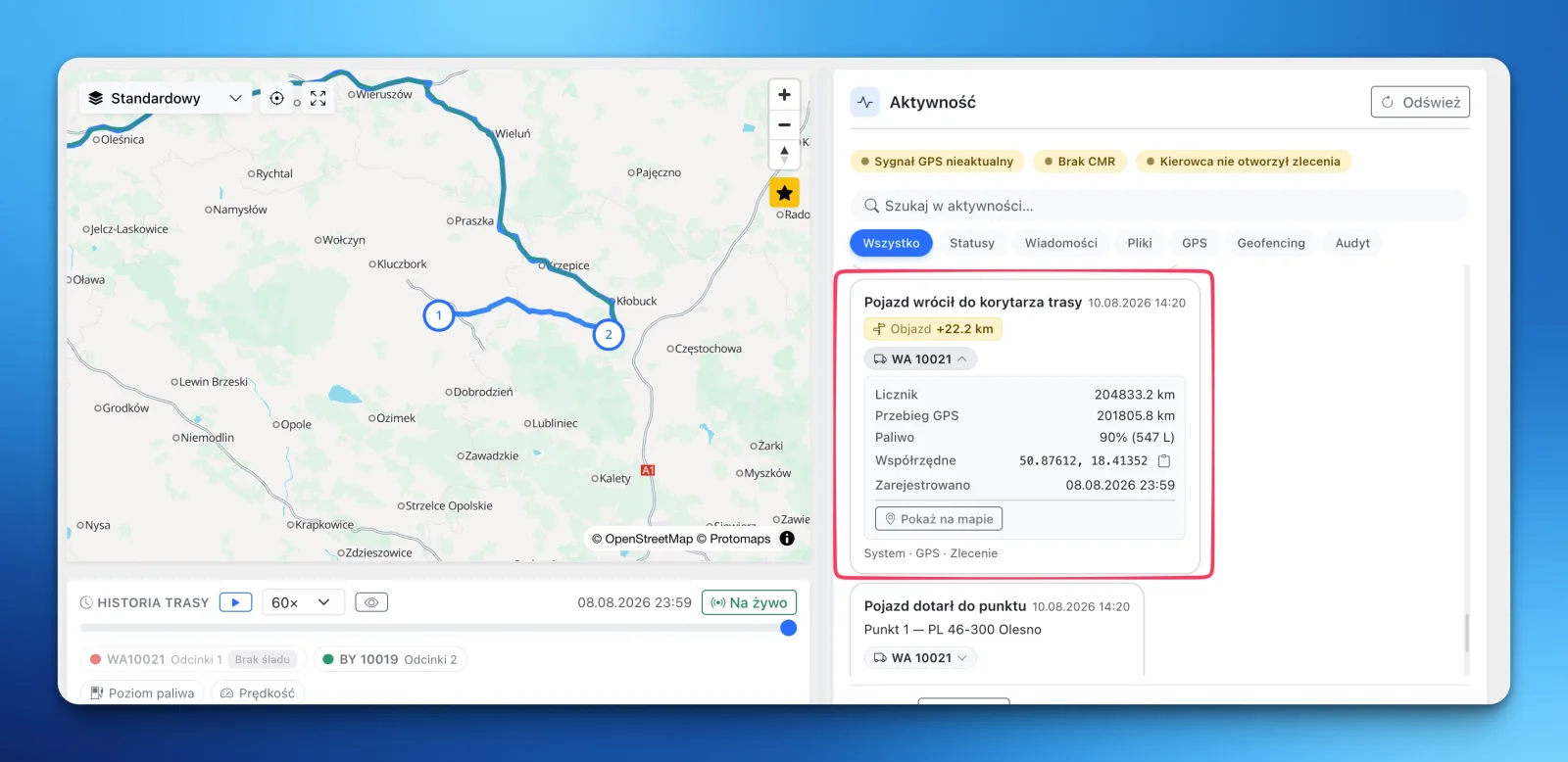
LiteTMS draws a corridor around an order's planned route and alerts the people you choose when the vehicle leaves it. When the vehicle returns, the order's activity log records the extra kilometers driven.
Details: Route corridor alerts
 Enlarge the image
- Default corridor width and alert rules are set once and inherited by new orders
- Thresholds can step up: a notification on any exit, an SMS further from the route
- Needs a vehicle with connected GPS and a saved route
Added Read the full story: Route corridor alerts Copy the link to this feature
-
Deadlines and service reminders
Record when insurance, inspections, licences and service are due for vehicles, trailers and employees. LiteTMS puts the dates in the calendar and reminds you before they pass.
Details: Deadlines and service reminders
- Service can be scheduled by date or by mileage
- Mileage reminders need odometer data from connected GPS
-
Vehicle inspections and handover protocols
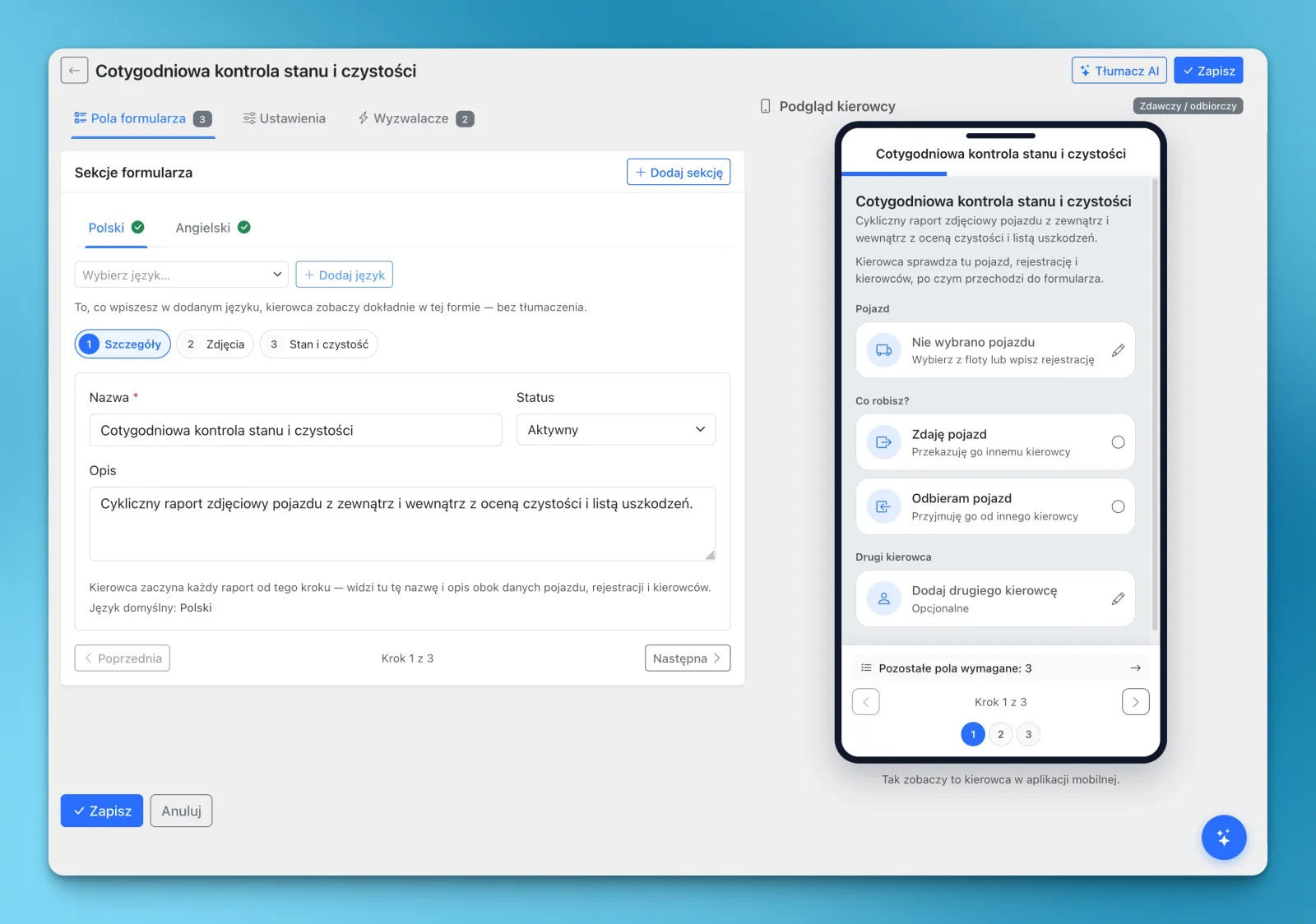
Build your own forms for a weekly vehicle check, a truck or trailer handover or a loading checklist. Drivers complete them in LiteTMS Mobile with photos and signatures, and reported damage is followed up in one place.
Details: Vehicle inspections and handover protocols
 Enlarge the image
- Recurring rules create the protocol daily, weekly or monthly
- AI translation prepares the form in the driver's language, and important instructions deserve a review
- Compare a handover with the return of the same vehicle
Added Read the full story: Vehicle inspections and handover protocols Copy the link to this feature
Communication
How the office, drivers and partners reach each other without leaving the order they are talking about.
-
Office and driver chat with translation
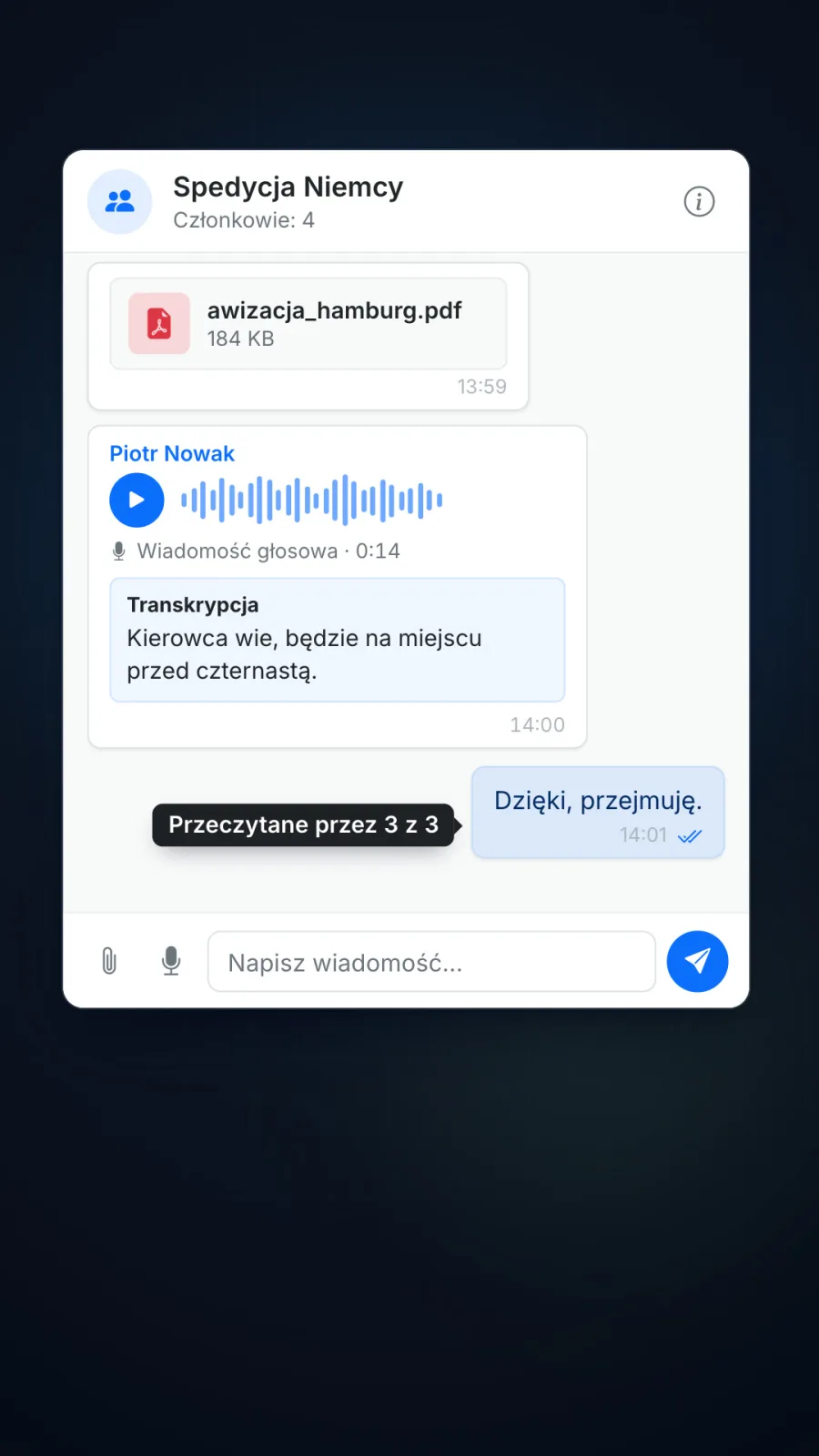
The office and each driver talk in one company thread, in the web panel and in LiteTMS Mobile. A message or a voice note can be translated into the reader's language, and a voice note gets a transcript.
Details: Office and driver chat with translation
 Enlarge the image
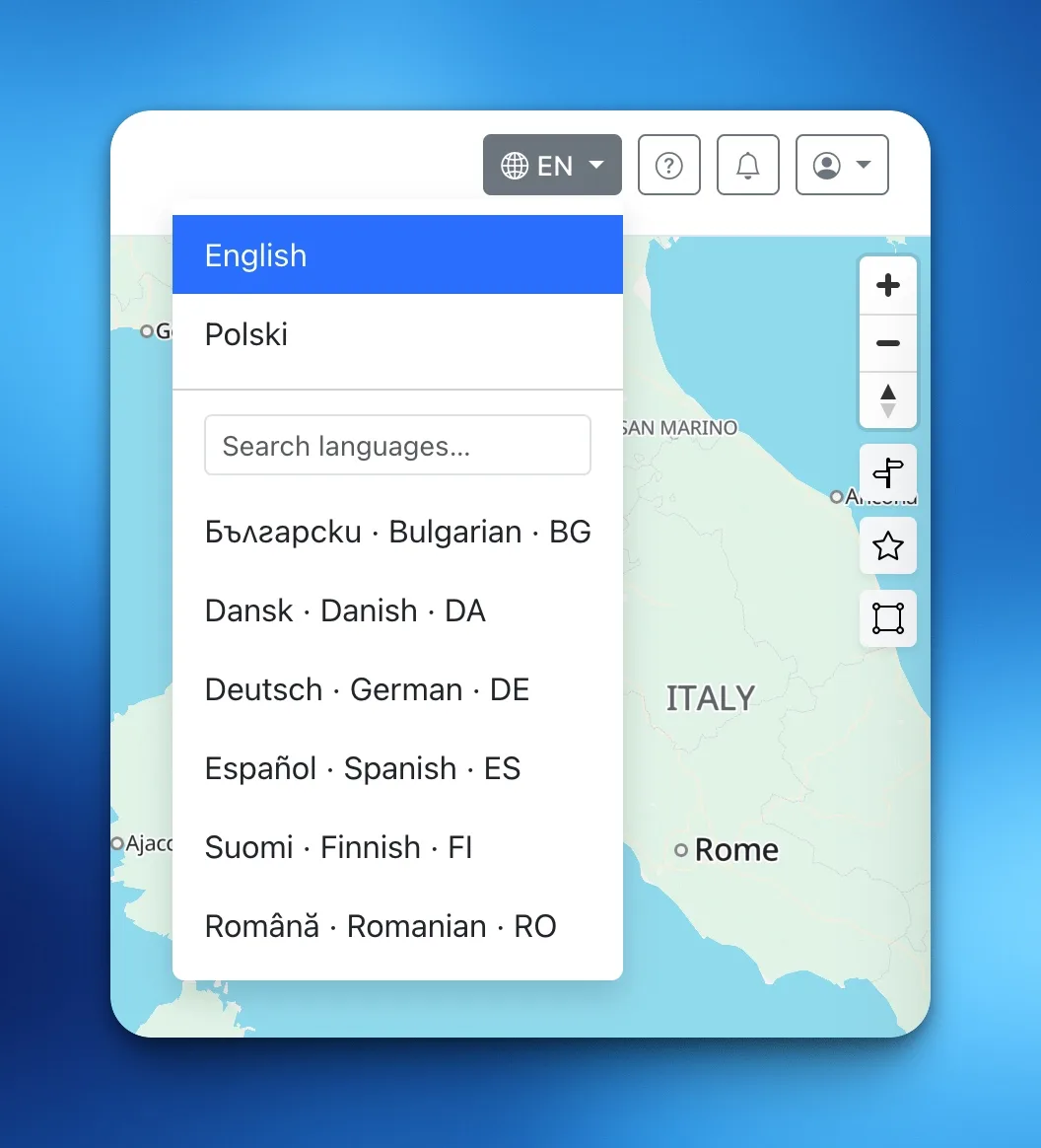
- Translation into any of 184 languages
- Photos, files and voice notes in the thread
- Translation and transcription use AI and are billed per use
Added Read the full story: Office and driver chat with translation Copy the link to this feature
-
Team chat and rooms
Office colleagues message each other directly or in rooms they set up themselves, for a market, a client or the warehouse, with files, photos and voice notes. The conversation stays in the company's TMS, next to the orders.
Details: Team chat and rooms
- Up to 100 people in a room, and members see its whole history
- The same colleagues and rooms in LiteTMS Mobile
- Part of LiteTMS, not a separate module
Added Read the full story: Team chat and rooms Copy the link to this feature
-
Orders mentioned in chat
Type @ in a chat message to pick an order, or paste its link. The message shows the order as a label that opens it, for everyone who is allowed to see that order.
Details: Orders mentioned in chat
- The order open on screen is suggested first
- Someone without access sees the text, not the order
-
SMS from the order
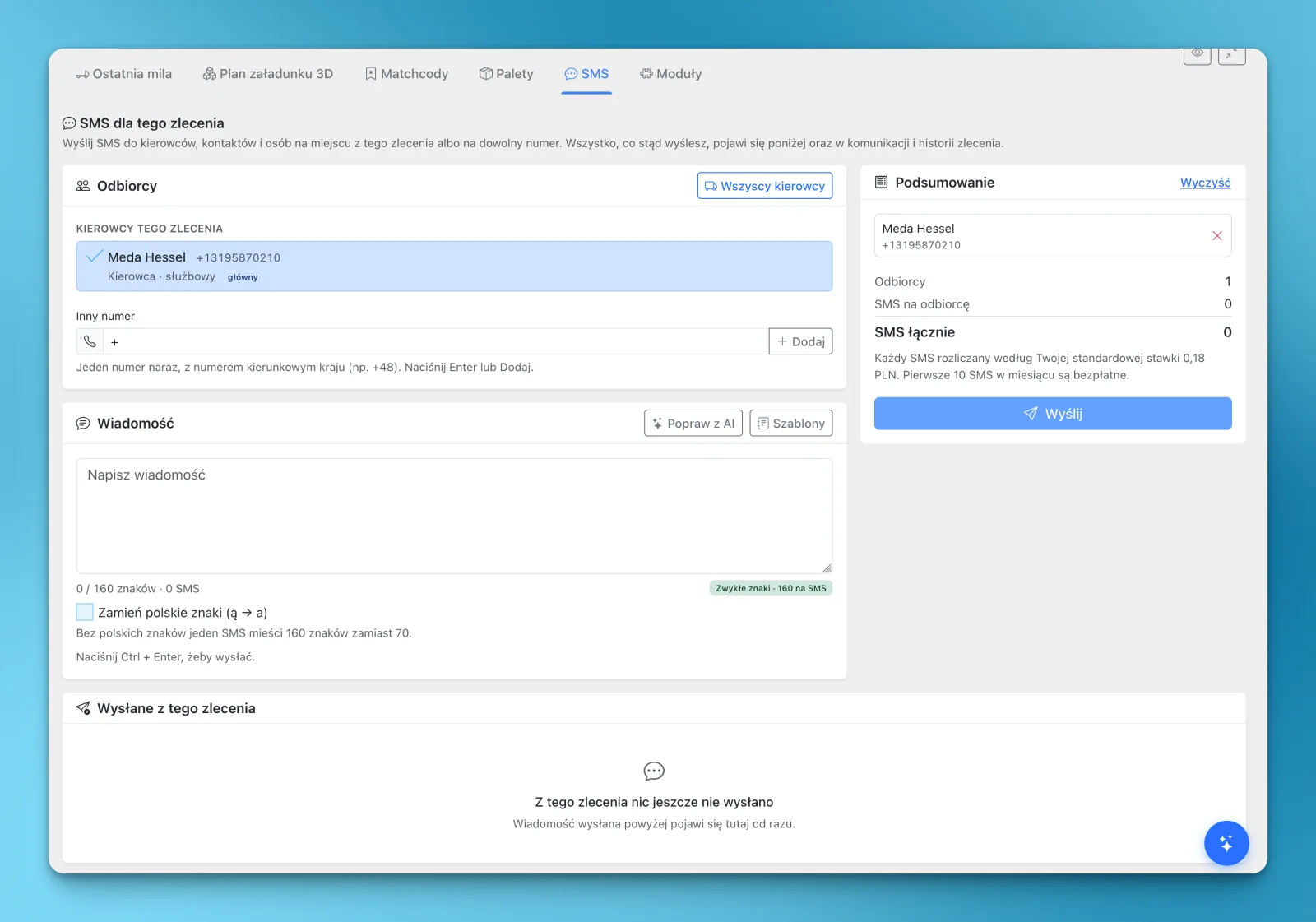
Text an order's assigned drivers, contractor contacts, site contacts or any number you type, straight from the order. It arrives as an ordinary SMS, so the recipient needs no app, and what was sent stays with the order.
Details: SMS from the order
 Enlarge the image
- Templates and AI help for the messages you repeat
- You see how many SMS a message takes before you send it
- The module is free to switch on, and each SMS is billed at the rate shown in your panel
- Delivery reports come from the mobile network
Added Read the full story: SMS from the order Copy the link to this feature
-
Email from the order, documents attached
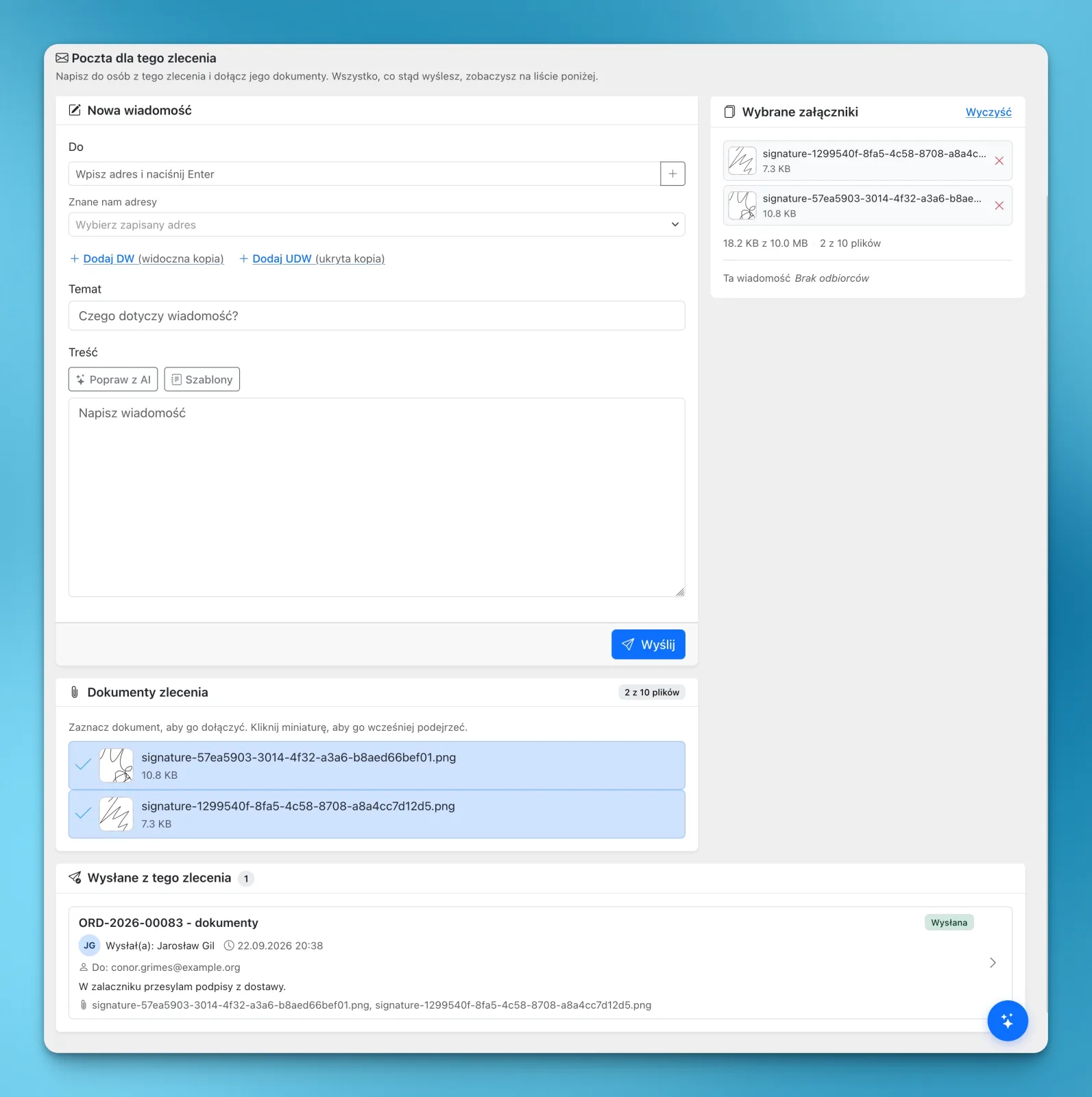
Write an email inside a transport order and attach that order's own documents: a CMR scan, unloading photos, the signature the driver collected. Replies come to your inbox, and every sent email stays with the order.
Details: Email from the order, documents attached
 Enlarge the image
- The customer's addresses are one click away
- Templates, a signature and AI help with the wording
- The module is free to switch on, and each email is billed at the rate shown in your panel
Added Read the full story: Email from the order, documents attached Copy the link to this feature
-
Company news for drivers
Publish an announcement once and drivers read it in LiteTMS Mobile. You can write it in several languages, or have AI translate it into the ones your company uses.
Details: Company news for drivers
- Pictures in the announcement
- AI translation is billed per use
Documents and finance
The paperwork and the money of each job, kept with the job.
-
Documents kept with the order
CMR scans, delivery photos, signatures and other files are stored on the order they belong to, in categories you define, with a preview that opens without downloading.
Details: Documents kept with the order
- Thumbnails and one preview for images, PDFs and video
- Stored files count toward file storage
-
AI check of a CMR against the order
LiteTMS reads an uploaded CMR and compares what it finds with the order's data, then shows the differences for a person to review.
Details: AI check of a CMR against the order
- It does not confirm that a document is authentic or legally valid
- Each check is billed as AI usage
-
Order result: revenue, costs and margin
Each order shows its revenue, its recorded and estimated costs and the resulting margin, with the plan beside the actual figures.
Details: Order result: revenue, costs and margin
- Costs per leg, vehicle, trailer or driver, and tolls per country
- Leave a cost out of the result without deleting it
- The result is as complete as the costs you record
-
Transport invoices from the order
Issue the invoice from the order it bills, preview the PDF and send it by email. Payments are recorded against the invoice, so its status follows what has actually been paid.
Details: Transport invoices from the order
- Company bank accounts per currency
- The invoice is printed in the language you choose
- Check the invoicing requirements of your country before you rely on it
-
Pallet exchange notes and balances
Create digital notes for EUR/EPAL and other pallet exchanges at loading and unloading, and see who owes pallets to whom.
Details: Pallet exchange notes and balances
- Drivers record the counts in LiteTMS Mobile
- Damaged pallets are counted apart from the balance
- Returns, charges and corrections are recorded
-
Reports and your own charts
Use the ready reports or build your own on orders, stop times or fleet mileage, with charts and filters, and export the result.
Details: Reports and your own charts
- Starter reports you can edit
- Reports on the modules you built yourself
AI and customization
Help inside the product, and ways to make it fit how your company works.
-
AI assistant
The AI assistant answers how-to questions inside LiteTMS and can open the relevant screen or start a guided tour.
Details: AI assistant
- Guided tours show where to click to add a vehicle, employee, trailer or contractor
- It answers in the language of your interface
- Chat answers are billed as AI usage, and guided tours are not
-
AI Builder: your own modules
Describe a tab, register or report in plain language and the AI Builder turns it into fields, lists, filters and charts that you review before you use them.
Details: AI Builder: your own modules
- Start from a record your team already keeps in a spreadsheet
- Adjust the fields as you use the module
- Custom views may carry their own charges
Added Read the full story: AI Builder: your own modules Copy the link to this feature
-
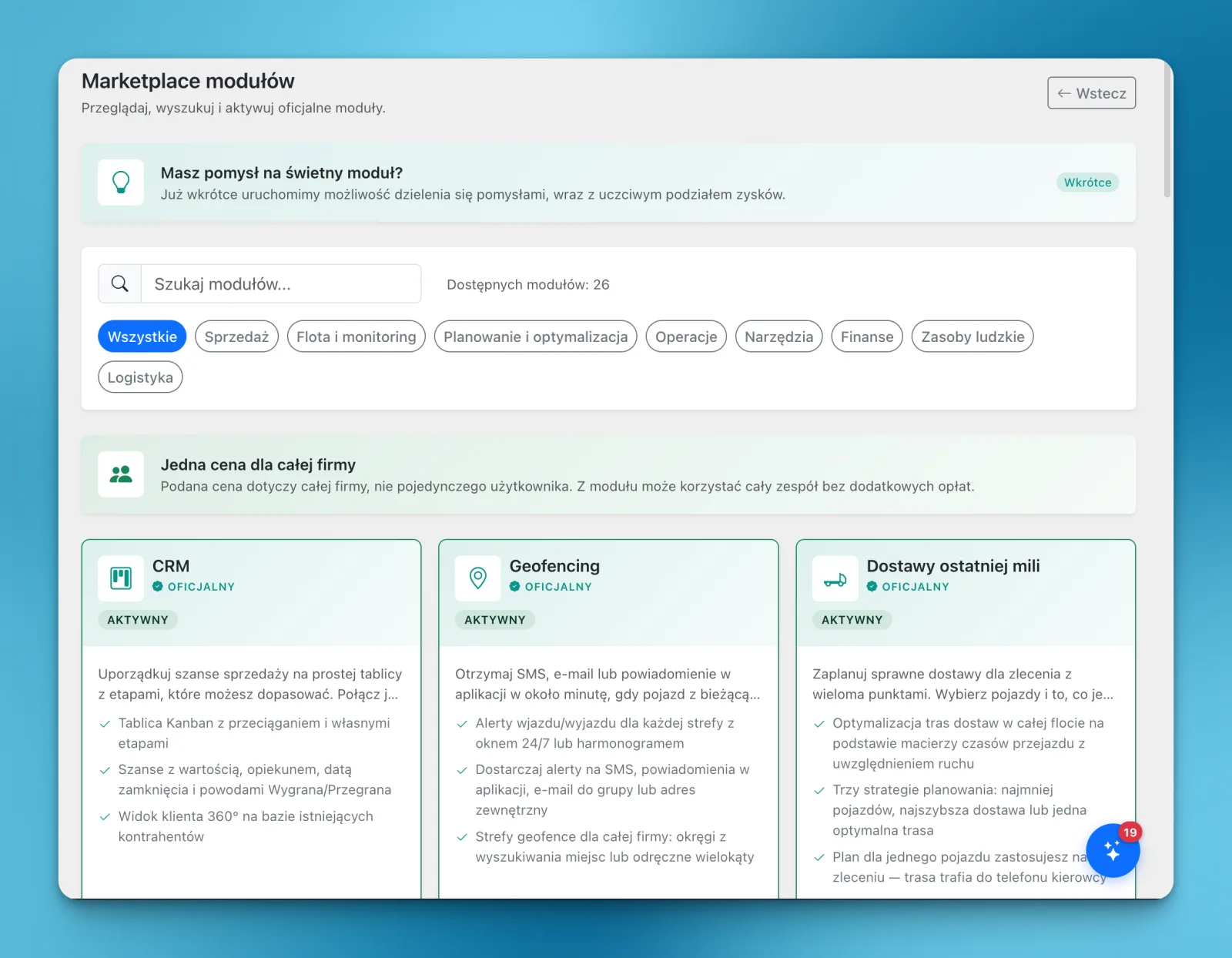
Module marketplace
Switch on the modules your company needs, try them in daily work and keep the ones that fit. If a module is not useful, you cancel its renewal in the panel.
Details: Module marketplace
 Enlarge the image
- Some modules start with a free trial
- One price per module for the whole company
- Examples: CRM, 3D load planning, last-mile planning, pallet exchange, inspections, order templates, order export, SMS and email
Added Read the full story: Module marketplace Copy the link to this feature
-
CRM for customers and deals
Keep sales opportunities on a board with stages you can adjust. Link them to existing customers and employees, record every contact and use reports to plan sales.
Details: CRM for customers and deals
- Several boards, each shared with the people you choose
- A won deal can become an order
-
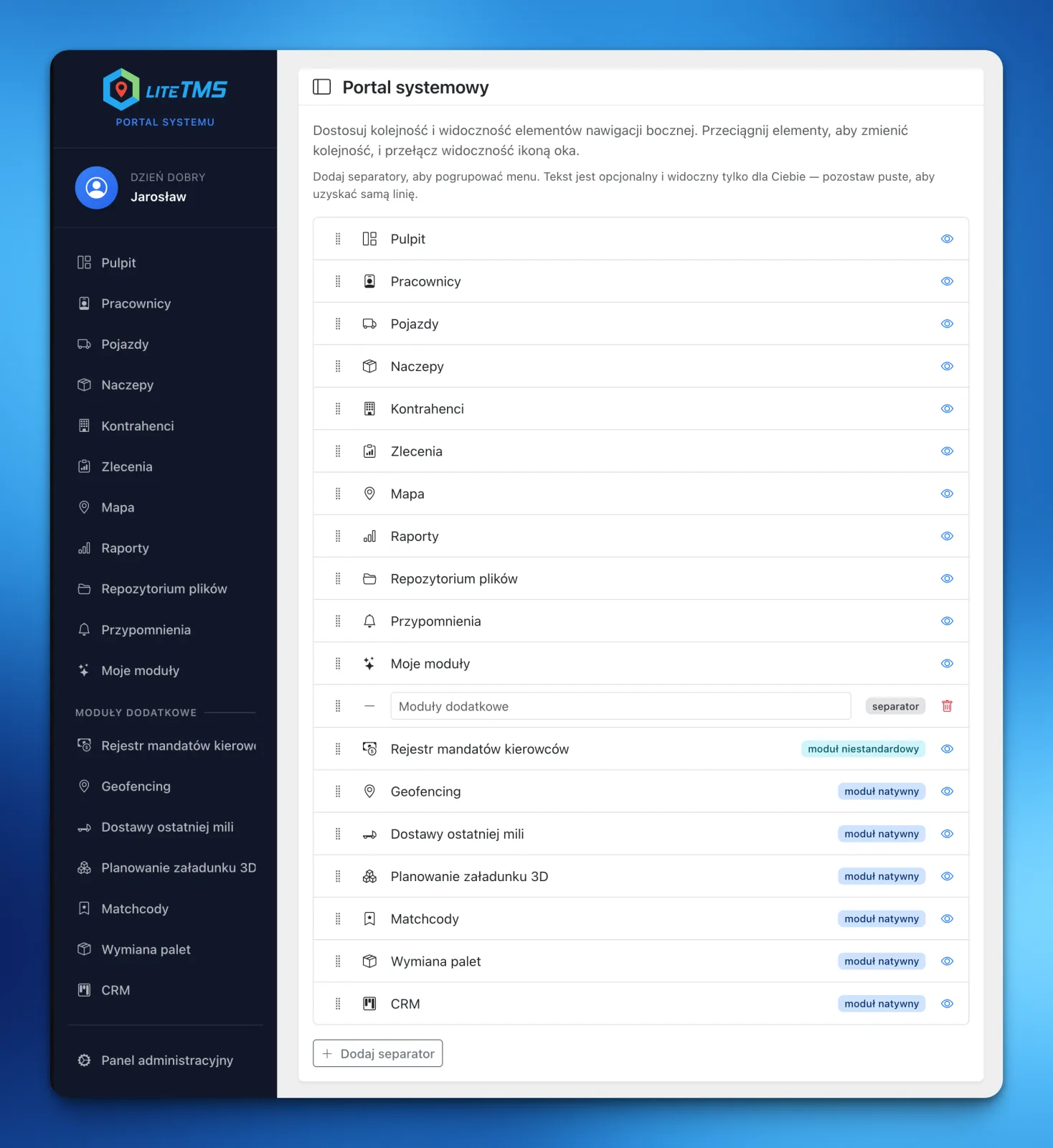
A sidebar menu each user arranges
Every user shapes the menu around their own job: hide items they do not use, move important modules to the top and divide the menu into named sections.
Details: A sidebar menu each user arranges
 Enlarge the image
- A dispatcher, a fleet manager and an owner can each have a different layout
Added Read the full story: A sidebar menu each user arranges Copy the link to this feature
-
Command palette
Press Ctrl+K or Cmd+K and type where you want to go or what you want to do. The list shows only what your permissions allow.
Details: Command palette
- It also opens the tabs of the order you are looking at
Languages, access and data
Who can use what, in which language, and how your data gets in and out.
-
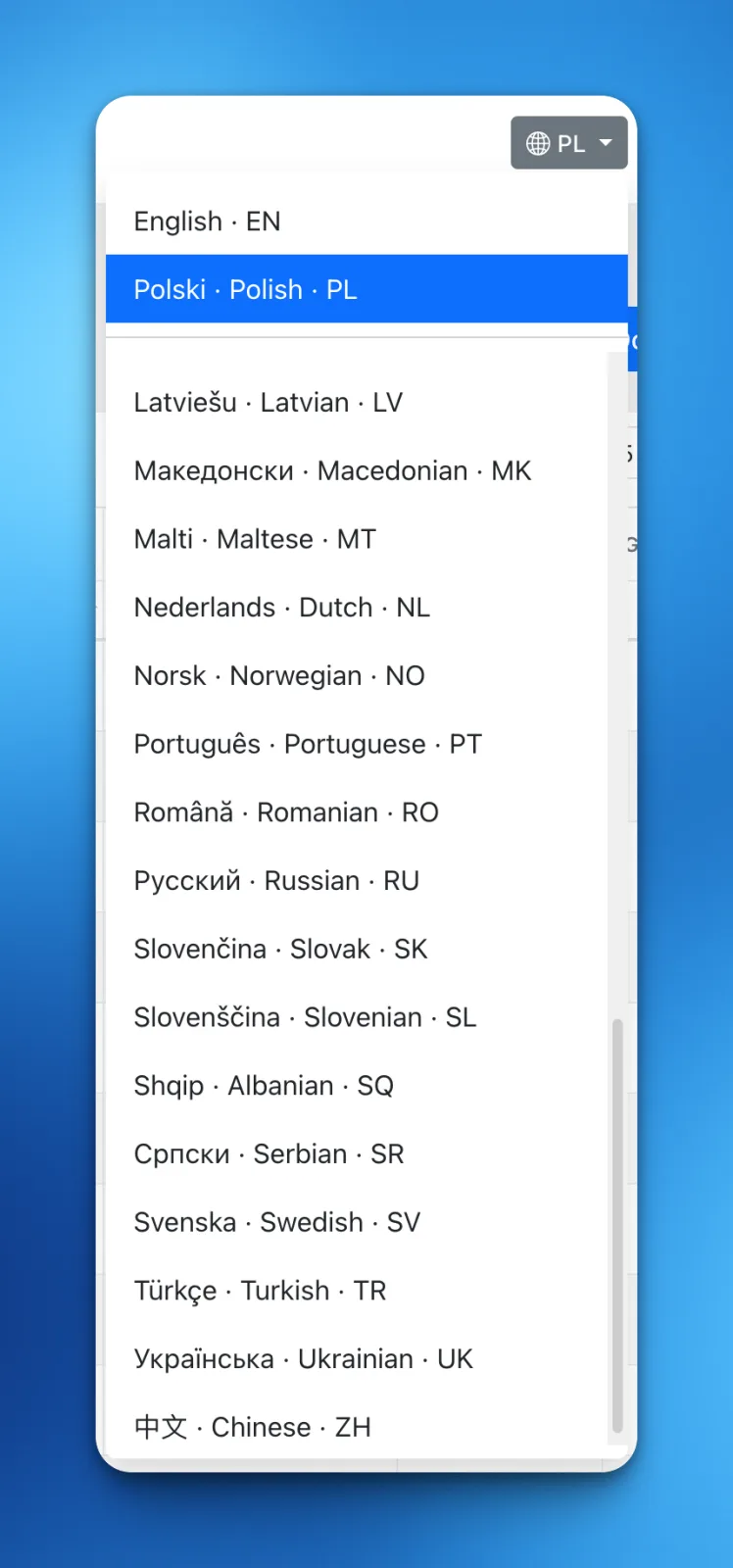
41 interface languages
The web panel and LiteTMS Mobile are available in 41 languages. English and Polish are written by the LiteTMS team, and the other languages are automatic translations, labelled as such in the language switcher.
Details: 41 interface languages
 Enlarge the image
- A phrase missing from a translation is shown in English
- Each user chooses their own language
Added Read the full story: 41 interface languages Copy the link to this feature
-
Roles, branches and two-factor sign-in
Decide what each role may see and do, keep branches apart where needed and protect sign-in with a second factor. Security events are logged.
Details: Roles, branches and two-factor sign-in
- Each company has its own database for its operational data
- Active sessions can be reviewed and ended
-
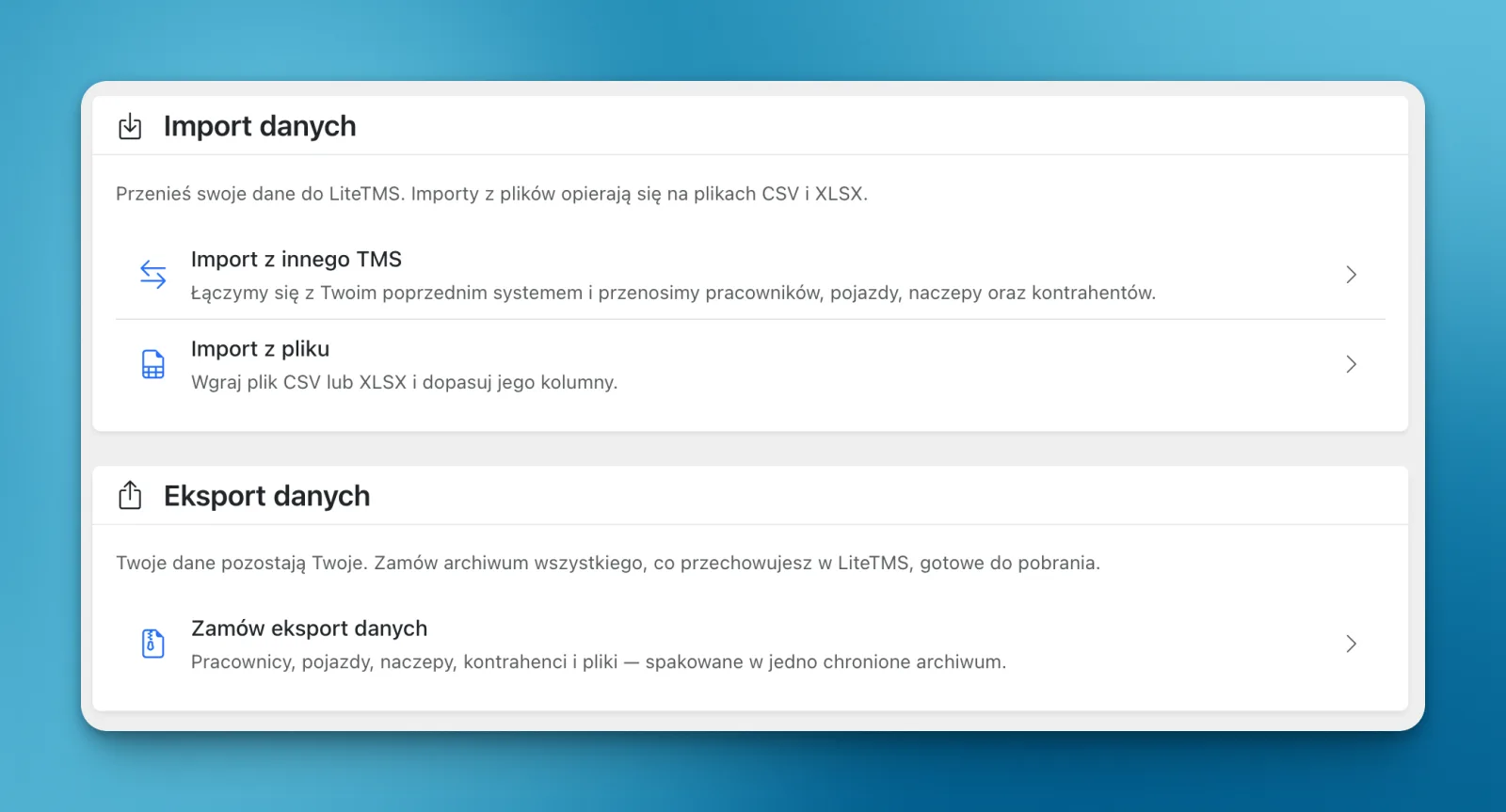
Data import and export
Bring employee, vehicle, trailer and contractor records in from a CSV or XLSX file: match the columns, review the data and confirm. You can also request an export of those records as a protected archive.
Details: Data import and export
 Enlarge the image
- Moving from another TMS: send an import request and the team helps
- What an export covers and how long data can be retrieved is set out in the Terms
Added Read the full story: Data import and export Copy the link to this feature
-
Costs you can see before the invoice
Orders and contractors are free and unlimited. For everything that is billed, the panel shows the rate and your current usage, and you pay from a prepaid balance with optional automatic top-ups.
Details: Costs you can see before the invoice
- No setup fee under the standard offer
- No minimum term under the standard terms
-
LiteTMS installed like an app
Add LiteTMS to the desktop or the home screen from the browser and open it like an application, with shortcuts to the places you use most.
Details: LiteTMS installed like an app
- Needs a browser that can install web apps
No feature matches that
Try another word, or write to us and say what you are looking for.
Perséinlechen Onboarding
LiteTMS ass live. Prett fir Är Entreprise u Bord ze huelen?
LiteTMS ass live, a mir onboarden nei Entreprisen perséinlech. Hannerloosst Är E-Mail-Adress, fir bei der nächster Onboarding-Grupp dobäi ze sinn. D'Self-Service-Umeldung kënnt geschwënn.
Op d'Onboarding-Lëscht setzen