
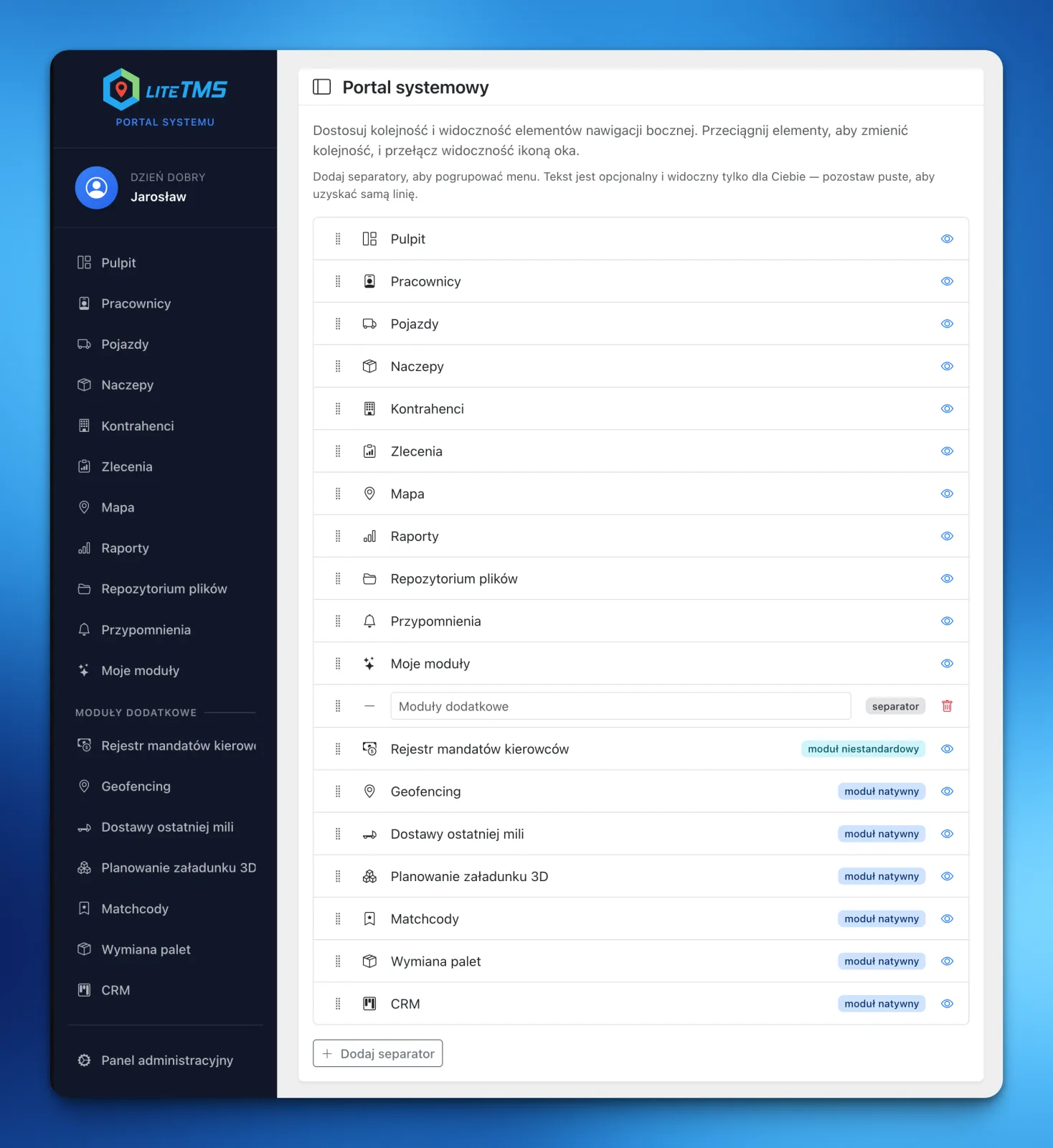
Every LiteTMS user can now shape the sidebar around their own job: hide items they do not use, move important modules to the top, and divide the menu into named sections. A dispatcher, fleet manager, and company owner no longer need to work from the same layout.
One company has several ways of working
The list of available tools grows with the business. New modules and custom views become useful, but they are not equally important to every person on the team.
A dispatcher may want Orders and Maps within immediate reach. Someone responsible for the fleet will open Vehicles, Trailers, and Reminders more often. The owner may care most about Reports and CRM. A fixed layout makes each of them scan past links that belong to somebody else's daily work.
The LiteTMS sidebar is now a personal setting. Each user can organize it without changing the menu for everyone else.
What you can change in the sidebar
The navigation editor gives you three straightforward controls.
Hide items you do not use
The eye icon removes a module or area from your sidebar. The feature remains available according to your permissions. It simply stops taking up space in everyday navigation.
If your responsibilities change, return to the settings and show the item again.
Put the important modules first
Every item is draggable. A dispatcher can put Orders at the top, while a fleet manager can lead with Vehicles and Reminders.
There is no single correct order. The useful order is the one that keeps your most frequent route through the system short.
Add separators and named sections
A longer menu can be divided with separators. Give each one a personal label such as "Daily work", "Fleet", or "Additional modules". Leave the label empty if a simple dividing line is enough.
These section names are private. Only the user who created them sees them.
Less scanning, faster orientation
This sounds like a small change until you compare two menus. One asks every available item to compete for attention. The other keeps four or five daily tools at the top and moves everything else lower or out of view.
That matters as a company activates more modules. A new tool does not have to make the sidebar longer for the whole team. People with the right permission can see it, then each person can decide where it belongs in their layout.
Personalization does not change access control. A user cannot add a module they are not allowed to open. They can only arrange the areas already available to them.
How to set up your LiteTMS menu
Open Settings, then choose Navigation. Drag items into the order you want, use the eye icon to hide unnecessary links, and add separators wherever a clear group helps. Save the navigation when the layout feels right.
If you want to start over, the default layout is one button away.
This update does not ask a transport company to change how it works. It gives each person a clearer route to the tools they already use. You can explore more ways to adapt the workspace in the LiteTMS features section.
Questions people ask
- Can every LiteTMS user have a different sidebar menu?
- Yes. The order, hidden items, and separators are saved separately for each user. Changing your own sidebar does not rearrange anyone else's navigation.
- Does hiding a module remove my access to it?
- No. Hiding an item only removes its shortcut from the sidebar. It does not change your permissions, and you can show the item again in the navigation settings.
- Can I group modules under my own section names?
- Yes. Add a separator, give it a label, and drag it to the right position. Leave the label empty if you only want a dividing line.
- Can menu customization reveal modules I am not allowed to use?
- No. Permissions remain authoritative. The editor only includes areas that have already been made available to that user.
Keep in touch
Make room for better reads.
Choose LiteTMS as a preferred source to find more of our articles on Google.
Choose LiteTMS on GoogleConfirm your choice on Google · Opens in a new tab