
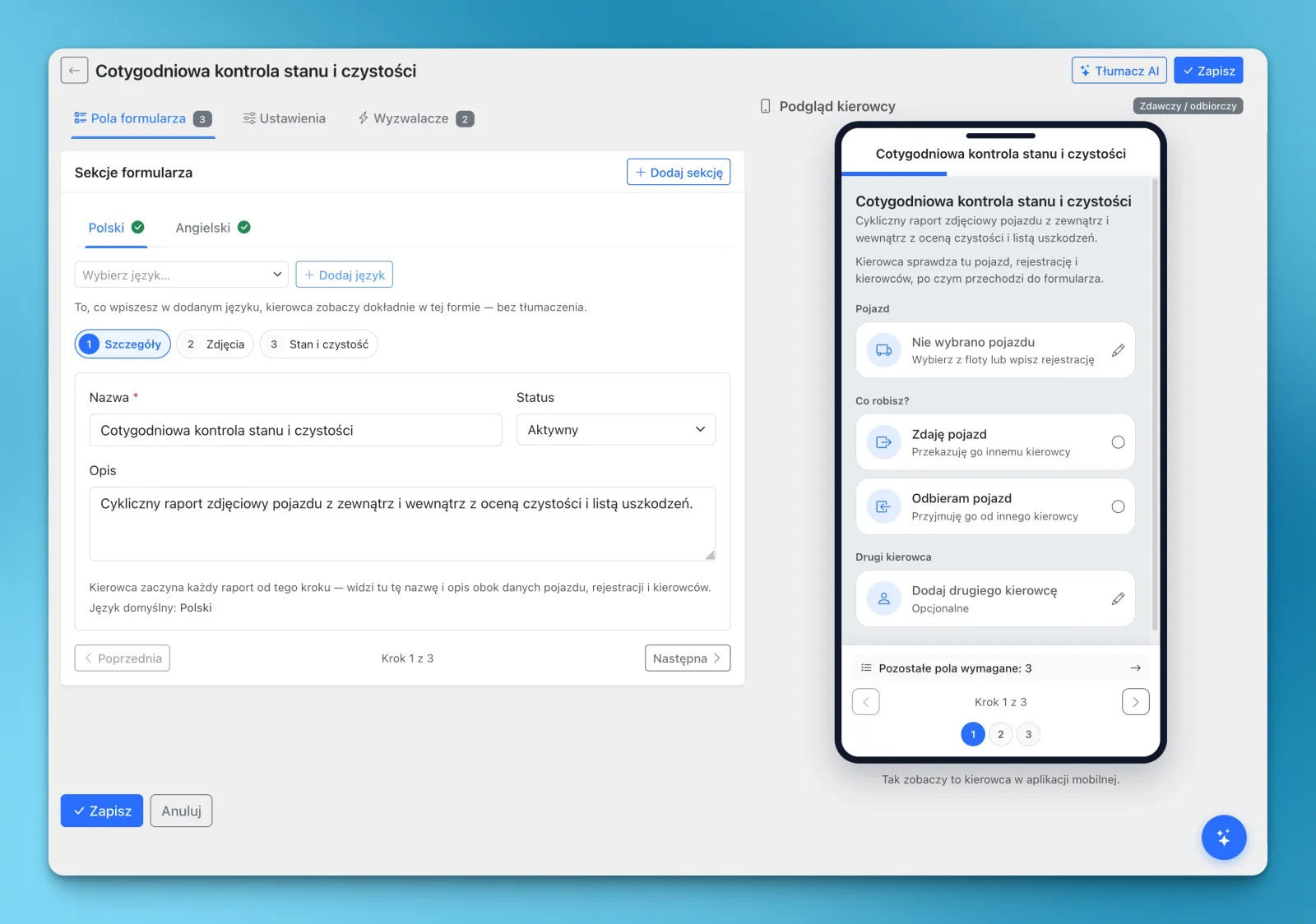
The Vehicle Protocols & Inspections module lets you create your own forms for drivers to complete in LiteTMS Mobile. A weekly vehicle check, a truck or trailer handover, a checklist for loading: you decide what to ask and what evidence to collect. AI translation can prepare the form in any of the 41 languages available in LiteTMS, with the target language enabled for your company.
A request to “check the vehicle” leaves a lot open. Does that include the cab, the trailer, the equipment or photos of existing damage? A form turns that request into specific questions the driver can work through, in a language they understand.
Start with what your company needs to know
You build the form around your own procedure. Write the questions, arrange them into sections and choose which answers are required. A short condition check can stay short; a detailed handover can ask for more evidence.
The available fields include choice questions, short and longer text answers, numbers, dates, photos, signatures and damage checklists. Instruction blocks let you explain what to inspect before asking for an answer. The builder also shows a phone preview, so the office can see how the form will look to the driver.
For example, a company could ask whether the vehicle has new visible damage, request a photo of an affected area, then leave space for a description. A different form could focus on equipment or the condition of the loading space. The questions and answer options belong to your procedure.
A weekly record of the vehicle's condition
Create a recurring inspection to ask drivers about the vehicle at regular intervals. A weekly schedule can cover cleanliness, equipment and newly noticed damage, using the same questions each time.
The driver receives a pending protocol and completes it in LiteTMS Mobile. A damage checklist can collect notes and photos alongside the reported issue. The office can then review the completed report and the recorded damage history for the vehicle or trailer.
This gives the next conversation a useful starting point: what was reported, when, and with which photos. It also helps separate a newly reported problem from damage already recorded.
A handover form when the vehicle changes
When one driver takes over a truck, a handover report can record its condition and equipment at that moment. You decide which questions matter, whether photos are needed and whether to request a signature.
With an active reassignment rule, a vehicle change recorded in the system can create a pending protocol automatically. Depending on the rule, it can be assigned to the incoming driver, the previous driver when identified, or both.
Forms can also cover trailer handovers. For a trailer-only swap, assign the protocol from the office or let the driver start it, if that option is enabled on the template. The automatic reassignment trigger currently follows a change of vehicle.
A checklist for loading, built around the job
The same module can hold a checklist for the driver to complete during loading. For example, your procedure might ask for the condition of the loading space, a seal number, a photo or a note about a discrepancy.
The office can assign the form, or a driver can start an allowed template when needed. That lets you use the same builder for recurring inspections and checks tied to a particular situation. Loading checklists do not have to use the same questions as a vehicle handover.
Your questions in the driver's language
A carefully written checklist only helps if its questions are understood. AI translation can translate the form's questions, instructions and answer options into the driver's chosen language, including the 41 languages available in LiteTMS. The target language must be enabled for the company when generating a new translation.
For example, the office can prepare the procedure in Polish and provide a Romanian or Ukrainian version for drivers. The driver can read the questions without needing to speak the forwarder's language. Written responses can also be translated for the office.
You can supply your own language versions, too. Review AI translations before relying on them for important instructions, particularly technical terms and anything affecting safety. Translation helps communicate the procedure; the company still decides what the procedure should say.
Try one procedure first
Start with a check your team already performs. Put its questions into a template, choose the required photos or answers, and decide whether the office assigns it, drivers start it themselves or a recurring rule creates it. Then review the phone preview and prepare the languages your team needs.
Vehicle Protocols & Inspections is an optional module. Access requires activation and appropriate permissions; AI translation follows the company's configuration and usage limits and may incur charges.
Have a paper form you would like to use in the app? Contact us about a LiteTMS demonstration and bring it along. It is a good place to start.
Questions people ask
- Can I create a vehicle inspection form with my own questions?
- Yes. You can define sections, questions, answer options and required fields, including photos, signatures and damage checklists. Drivers complete the forms in LiteTMS Mobile.
- Can drivers receive a vehicle check every week?
- Yes. An active recurring rule can create pending protocols on a weekly schedule. Daily and monthly schedules are also supported.
- Can a protocol appear automatically when a driver changes trucks?
- Yes, with a configured reassignment rule and a vehicle change recorded in the system. A trailer-only change uses a manually assigned or driver-started protocol rather than that automatic trigger.
- Can the driver read a protocol in a different language from the office?
- Yes. AI translation supports the 41 languages available in LiteTMS, with new translations limited to languages enabled for the company. You can also prepare your own language versions, and important AI-translated instructions should be reviewed.
Keep in touch
Make room for better reads.
Choose LiteTMS as a preferred source to find more of our articles on Google.
Choose LiteTMS on GoogleConfirm your choice on Google · Opens in a new tab