
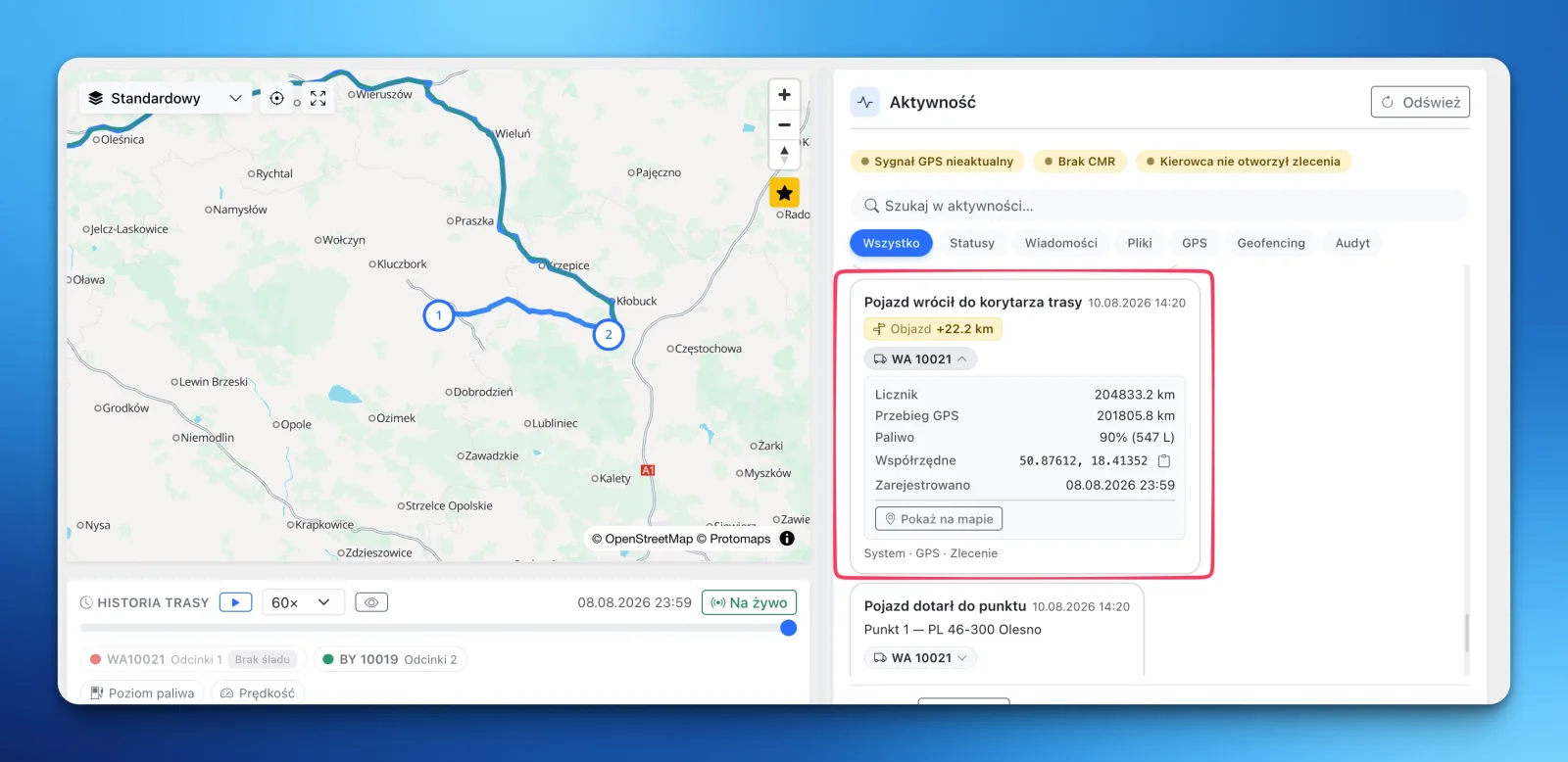
Every order in LiteTMS can have a corridor drawn around its planned route. When the vehicle leaves it, the right people get an alert. When it comes back, the order's activity log records the return along with the extra kilometers driven, and one click shows the exact spot on the map.
The route came out longer. But why?
You know the conversation. The fuel receipt doesn't match the plan, the customer asks why the truck arrived late, and the driver says he "had to go around". Maybe he did. But how long that detour was, and which way it went, is usually gone for good. The GPS positions exist somewhere. Nobody is going to replay a whole day of driving point by point a week later.
LiteTMS does it as the truck drives, on every order, without anyone watching a map.
You set the corridor once, on the order
Each order has a Geofencing tab. It shows the planned route with a band around it, and you set the band's width in meters: one value for the whole order, or a different one per leg. Keep it tight on a fixed lane, give it room where the driver has a real choice of roads.
Every loading and unloading point gets its own circle too, so the system records on its own when the truck arrived and when it left.
The default corridor width and the default alert rules live in your company settings. Every new order inherits them, so nobody has to remember anything.
Off route: a message to the right person
The system compares positions from your connected GPS against the corridor roughly every minute. When the vehicle moves outside the band, your alert rules fire, and you decide what happens at what distance.
Thresholds can step up. For example: an in-app notification on any exit, an email once the truck is 500 meters out, an SMS at a kilometer. A small shortcut wakes nobody, a serious deviation reaches whoever should know. Each rule has its own recipients, picked by person or by role, such as all dispatchers.
A rule fires once per deviation. You won't get ten copies of the same message because the driver ran parallel to the route for half an hour.
The return: extra kilometers, counted
Here is the part that's usually missing. When the vehicle comes back inside the corridor, the order's activity log gets an entry that reads "Vehicle back in the route corridor", with the detour next to it, for example "Detour +12.4 km". That is the distance driven between leaving the route and returning, taken from the vehicle's mileage counter when the telematics sends one, or from the length of the GPS track when it doesn't.
It changes the conversation about a long route. Not "I think you went the long way", but: left the route at 14:32, back at 15:10, 12 kilometers extra. Sometimes the explanation is simple, roadworks or an accident. Either way you have a number, not an impression.
Every event, visible on the map
Each entry has a "Show on map" button. The map flies to the exact spot, so you see where the driver left the route and where he rejoined it. And if you're watching the trip playback on the order overview, the map jumps straight to that moment.
Entries for arriving at and leaving each stop work the same way. The whole story of the trip, detours and stops included, stays on the order and reads just as easily a week later.
What it needs to work
The corridor watches itself on one condition: vehicle positions have to reach LiteTMS from connected telematics. If your fleet already has GPS, you connect it and the monitoring starts. SMS and email alerts are billed like any other message sent from LiteTMS, and you see the rates and your usage in the panel before anything reaches the bill.
Watching places rather than routes? That's what zones are for: an alert when a vehicle enters or leaves a zone.
Register your company free, set a corridor on your first order, and find out what the detours in your fleet really add up to.
Questions people ask
- How does the system know a driver left the route?
- LiteTMS compares positions from your connected GPS with a corridor drawn around the order's planned route, roughly every minute. When the vehicle is outside the corridor, the alert rules you configured fire.
- How are the extra kilometers calculated?
- When the vehicle returns to the corridor, LiteTMS measures the distance driven between leaving and returning: from the mileage counter reported by the telematics, or from the length of the GPS track for that period when no counter is available. The result appears in the order's activity log.
- Can I get an SMS when a truck goes off route?
- Yes. Each alert rule has a channel (in-app notification, email, or SMS), a distance threshold, and its own recipients. Thresholds can step up, for example a notification on any exit and an SMS only once the vehicle is a kilometer out.
- Do I have to configure the corridor on every order?
- No. The default corridor width and the default alert rules are set once in your company settings, and every new order inherits them. On a specific order you can change them, including a different width per leg of the route.
Keep in touch
Make room for better reads.
Choose LiteTMS as a preferred source to find more of our articles on Google.
Choose LiteTMS on GoogleConfirm your choice on Google · Opens in a new tab