
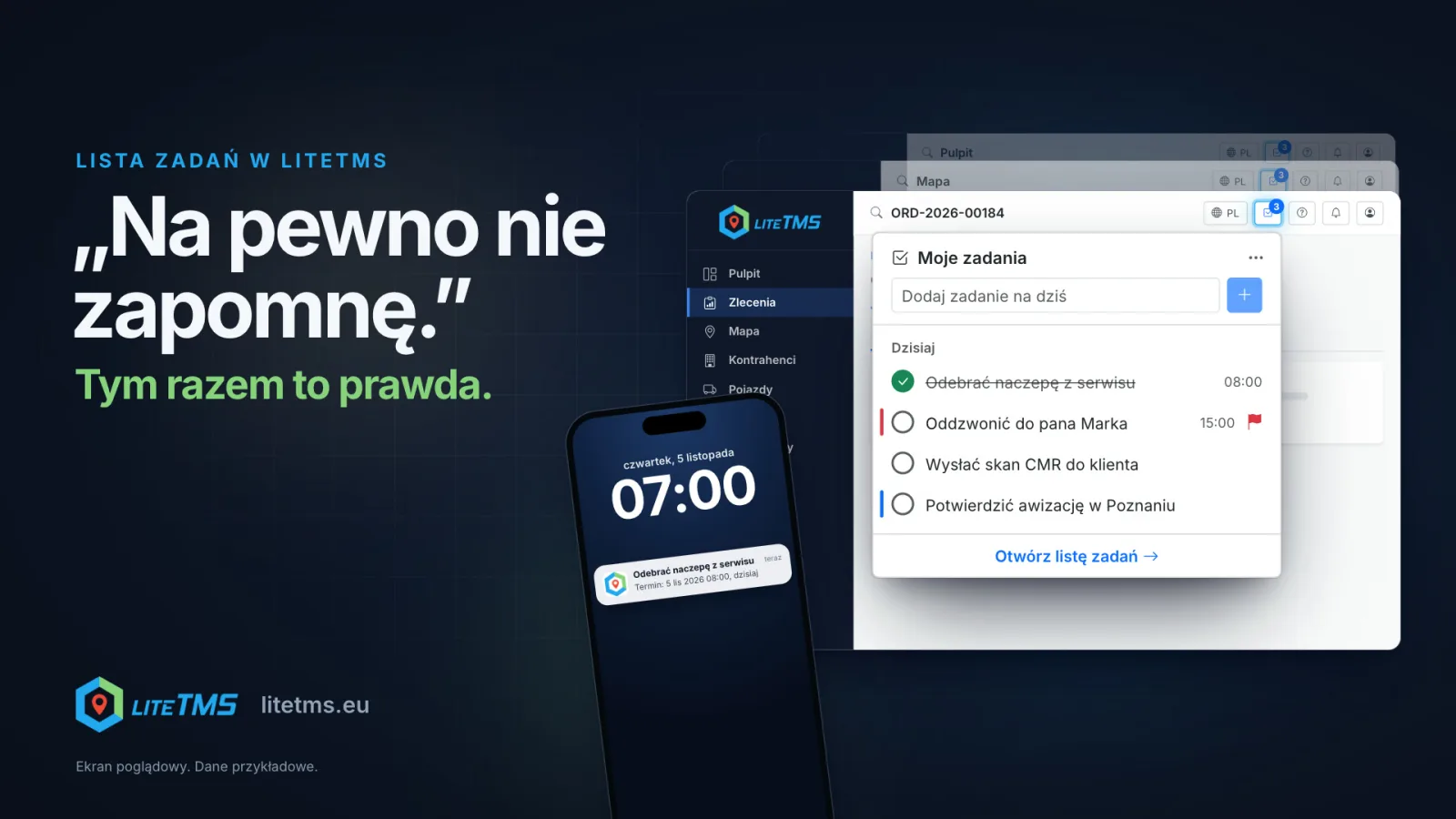
The To-Do List is a LiteTMS module that gives every office user a private list of their own. Its icon sits in the top bar of every page, so you add a task or tick one off without leaving the order you are working on. You can also just say the task: AI turns a voice memo into a draft with a name, a due date and a reminder, which you check and add. LiteTMS then reminds you in the app and, if you choose, with a push to LiteTMS Mobile, an email or a text message, at the moment you pick.
The film is narrated in Polish.
"I definitely won't forget" and the call at 5:40 pm
In the morning you promise a customer you will call back at three about the rate. Easy enough. Then a delivery slot needs confirming, a driver calls from the unloading point because they will not take two pallets, an invoice is waiting, and the phone rings three times in a row. At 5:40 pm the customer calls, and they are the one who remembered.
Small promises like that fill a forwarding office's day: call back, send the CMR scan, confirm the slot, collect the trailer from the workshop. Each one is tiny, and together they slip through the cracks between orders. The To-Do List gives them a place you can reach in seconds, right where you already work.
The list in the top bar, on every page
Once the company turns the module on, a list icon appears in the LiteTMS top bar, next to the language menu. It sits in the same spot on the dashboard, in orders, on the map and everywhere else in the system. The number on the icon counts what is due today plus anything overdue, and it turns red when something is overdue.
A click opens the My to-dos panel. At the top is a field that adds a task for today, and below it today's tasks with their times. Type, press Enter, and the task is on the list. The round check next to a task ticks it off. The page underneath stays open, so you are back exactly where you were, for example in the order that reminded you of the call.
The full list has its own page with the views Today, Upcoming, All tasks and Completed. You can also add a task from the command palette: Ctrl+K or Cmd+K, then "Add a to-do". If the icon is in your way, you can hide it for yourself with one click and bring it back in the list's settings.
Say the task instead of typing it
The new-task field has a microphone. You record a voice memo of up to two minutes, for example "Tomorrow at eight, pick up the trailer from the workshop. Remind me an hour before." LiteTMS turns the recording into text, and AI builds a task draft from it: the name, the day, the time and the reminder. It can also fill in notes, steps, priority, repetition and the list when you mention them.
The draft opens marked "with AI", with your own words underneath. Nothing is saved by itself: you check the fields, fix what needs fixing and click "Add task". The "Fill in with AI" button works the same way when you would rather type the sentence the way you would say it.
You can do the same on your phone. In LiteTMS Mobile, office users have a to-do tab with the views, quick add, voice memos and AI drafts. When something comes to mind on the road, record it at your next stop, not while driving.
Voice memos and AI drafts work while the company has AI features turned on, and they count toward the company's AI usage.
A reminder that arrives on time
A task with a due date can have a reminder: at the due time, 10 minutes or an hour before, a day before, at 9:00 on the day or the day before, or on any day and time you pick. The reminder always arrives as a notification in LiteTMS. On top of that you can choose:
- a push notification to LiteTMS Mobile, when you are signed in to the app on your phone,
- an email to your address, counted toward the company's email usage,
- a text message to the phone number in your profile, counted toward the company's text message usage.
The reminder gives the task's name and when it is due. Your task notes never leave LiteTMS in a reminder.
Tasks that come back on their own
Some jobs repeat every week or month: invoices on Monday, the fuel settlement at the end of the month, an inspection once a year. A task can repeat daily, on weekdays, weekly, monthly or yearly. When you tick it off, the next one appears straight away and a message tells you when it is due. Ticked it by mistake? Undo takes one click.
Lists, colours, steps and privacy
You can sort tasks into lists, such as Invoices or Customers, and mark them with colour labels. A bigger job splits into steps, and an urgent one gets a priority flag. A colour or a search narrows the list at once, and a bar above it names every filter that is switched on.
The list is private. Everyone sees only their own tasks, and the company administrator has no access to colleagues' lists in LiteTMS. It is a place for your own follow-ups, not for team assignments.
How to start
The To-Do List is a LiteTMS Marketplace module with a 7-day free trial. The Marketplace shows the current price before you turn it on. Once it is on, every office user has their own list in the browser and in LiteTMS Mobile. If your company does not use LiteTMS yet, start at litetms.eu.
Questions people ask
- Can my manager or the administrator see my tasks?
- No. The To-Do List is private: every user sees only their own tasks, and the company administrator has no access to them in LiteTMS.
- Can I add a task by voice on my phone?
- Yes. Office users can record a voice memo of up to two minutes in LiteTMS Mobile, and AI prepares a task draft for them to check. Voice memos work while the company has AI features turned on. Record at a stop, never while driving.
- How does LiteTMS remind me about a task?
- Always with a notification in LiteTMS and, if you choose, with a push to LiteTMS Mobile, an email, or a text message to the number in your profile. Emails and text messages count toward the company's usage.
- Do drivers get the to-do list in the app?
- No. The to-do tab in LiteTMS Mobile is for office users.
- How much does the To-Do List cost?
- It is a module with a 7-day free trial, and the LiteTMS Marketplace shows its current price before you turn it on. Email and text message reminders, voice memos and AI drafts also count toward the company's service usage.
Keep in touch
Make room for better reads.
Choose LiteTMS as a preferred source to find more of our articles on Google.
Choose LiteTMS on GoogleConfirm your choice on Google · Opens in a new tab