
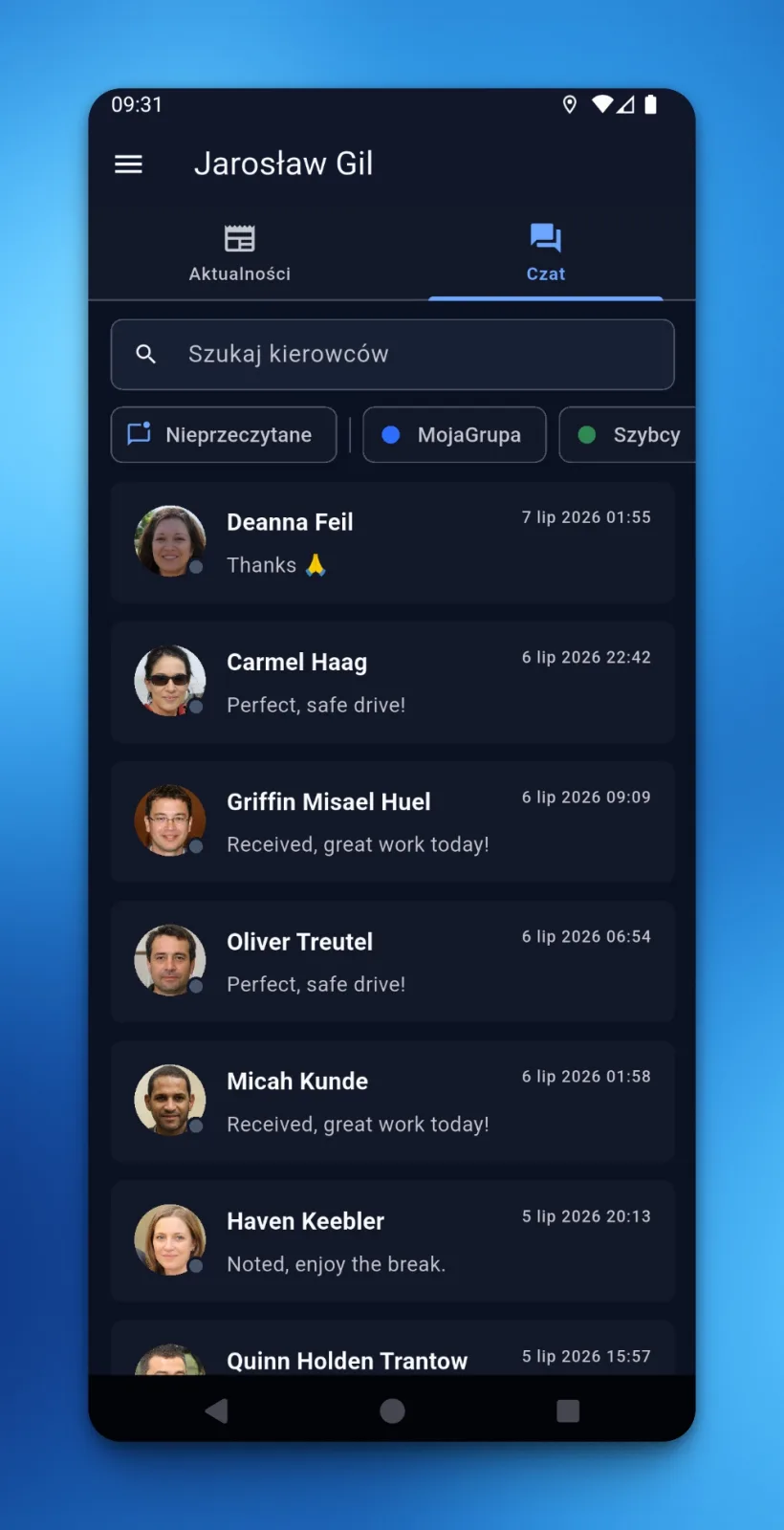
LiteTMS gives dispatchers a mobile directory of their driver conversations, with search, driver-group filters, unread counters and push alerts for new messages when notifications are enabled. A reply no longer has to wait until someone is back at the desk.
The office chat should not end at the office door
A dispatcher may spend most of the day at a large screen, but transport rarely respects that boundary. A driver sends an update while the dispatcher is checking a vehicle in the yard, walking between offices or dealing with something after hours. The message is small. Getting back to the right conversation should be small too.
That is why the LiteTMS mobile app has a dispatcher mode. Its Chat tab opens a directory of drivers within the branch scope available to that user. The latest message and unread count sit beside each name, so the list tells you where attention is needed before you open a thread.
Every permitted driver conversation is on one list
The directory is built for a real fleet, not a short contact list. You can search by driver and narrow the view to selected driver groups. An unread filter leaves only conversations that still need a response.
The same group selection also defines which drivers can trigger chat push notifications for that dispatcher. This matters when several people divide responsibility for the fleet. A person looking after one group does not need alerts from every other part of the operation, while someone with an unfiltered directory keeps the full branch-scoped view.
The result is simple: the list on the phone and the notifications around it follow the same working scope.
A new message can find the dispatcher
With chat notifications enabled on the phone, a new driver message can produce a push alert. The dispatcher knows there is something new before opening the chat directory again.
Unread counters still provide a second check inside the chat directory. If one notification is dismissed during a call, the conversation remains marked. Individual threads can also be muted when they should stay in the list without generating further alerts.
Push does not replace the conversation history. It is the prompt that brings attention back to the company chat.
Reply from the same company conversation
Opening a driver from the directory brings up the shared LiteTMS thread. The dispatcher can read the history and answer from the phone. Photos, files and voice notes stay in the company conversation instead of being scattered across private messaging accounts.
This is especially useful when the answer is short: confirm a change, ask for a document or acknowledge that the message arrived. Nobody has to remember to repeat that exchange in the TMS later, because it already happened there.
The mobile app remains useful for drivers, but the same app also gives dispatchers a practical way to stay connected when they step away from the board.
Register your company free and keep driver conversations inside LiteTMS.
Questions people ask
- Can a dispatcher access driver chats in the LiteTMS mobile app?
- Yes. In dispatcher mode, the Chat tab shows the driver directory available within that user's branch scope. The dispatcher can search the directory, open a thread, read its history and reply from the phone.
- Does the dispatcher receive a push notification for every message?
- Chat push alerts work when phone notifications are enabled. The selected driver-group scope and muted threads are respected, so alerts follow the conversations the dispatcher has chosen to monitor.
- Can a dispatcher show only unread conversations?
- Yes. The mobile chat directory includes an unread filter and unread counters beside driver conversations. A dismissed notification therefore does not remove the visual reminder inside the app.
- Are dispatcher and driver messages kept in the same conversation?
- Yes. The dispatcher opens the company thread for that driver and replies there. The conversation history remains in LiteTMS for the people who have access to it.
Keep in touch
Make room for better reads.
Choose LiteTMS as a preferred source to find more of our articles on Google.
Choose LiteTMS on GoogleConfirm your choice on Google · Opens in a new tab