
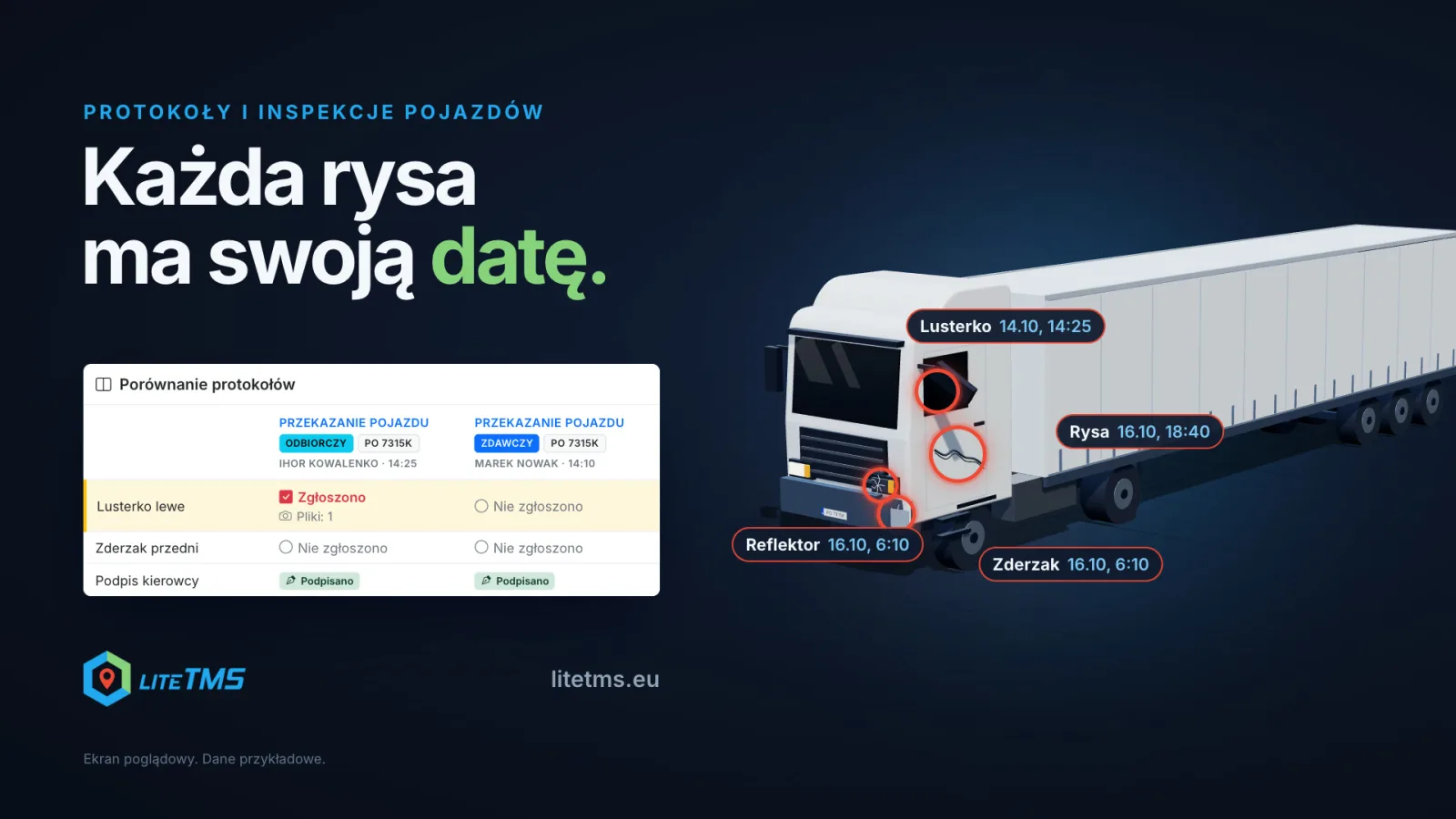
The Vehicle Protocols & Inspections module shows the state in which one driver handed a truck over and the state in which the next driver took it. Once you set a rule for vehicle changes, both drivers get a protocol on their phone: they tick the damage they find, add photos and sign. The office sees the two protocols side by side with the differences highlighted, records the cost of a damage and decides who is responsible for it. LiteTMS suggests who handed the vehicle over.
The film is narrated in Polish, with Polish captions.
The scratch is there; nobody knows where it came from
Say three drivers had the same tractor this week, and on Friday it comes back with a cracked mirror and a scratch on the door. Without a record of each handover, there is no way to tell on whose shift the damage happened. What is left is everyone trying to remember what they saw, and the repair often ends up on the company's bill.
A handover protocol turns that question into two records with a date, a time, photos and a signature. The driver handing the truck over fills in one, the driver taking it over fills in the other. If the mirror is intact in the first and cracked in the second, you know between which two protocols the difference appeared.
The protocol reaches the phone when the vehicle changes
In the protocol template you add the On vehicle reassignment trigger and choose who gets the protocol. With Both drivers, each side gets its own: the previous driver a handover protocol, the new driver a takeover protocol. The rule fires both when a driver picks the vehicle in LiteTMS Mobile and when the office assigns it.
The driver gets the notification "New protocol to fill in", and the protocol sits on the Tasks tab. The trigger reacts to a change of vehicle. When only the trailer is swapped, the office assigns the protocol, or the driver starts it if the template allows that.
The driver ticks the damage, adds photos and signs
On the list of damages and missing equipment the driver ticks what they found. A ticked item opens a note field and space for photos, and for video too if the template asks for it. If the form has a signature field, the driver signs the protocol on the phone screen. Damage already reported for that vehicle is shown above the list, so nobody reports it twice.
The company decides the questions, the list items and the required photos in the template editor. How to build your own form and prepare it in the driver's language is covered in Vehicle inspections: your questions, the driver's language.
Comparing protocols: the differences are highlighted
A takeover protocol shows the paired handover protocol of the same vehicle, if one was submitted within 72 hours, together with Compare with paired protocol. The Compare protocols view puts both protocols side by side, question by question. A row where the answers differ is highlighted: for example, "Left mirror" says "Reported" in the takeover protocol, with a note and one photo file, and "Not reported" in the handover protocol.
The comparison lines up answers: the ticked items, the notes, the values and the number of files. It does not analyse photos; you look at them yourself in the protocol. You can also compare a protocol with any other submitted protocol of the same vehicle, for example the last inspection.
Who is responsible: LiteTMS suggests, a person decides
Every reported damage lands on the Damages & settlements tab. The button next to a damage opens the Settle damage dialog. There you set the status (reported, in settlement, settled or dismissed), enter the cost and currency, add a settlement note such as an invoice number, and choose the responsible driver.
Next to the responsible driver, LiteTMS shows a suggestion. When the damage was reported at takeover, it suggests the driver who handed the vehicle over in that protocol, or, if there is none, the last driver who submitted a handover protocol for the vehicle. When the damage was reported at handover or in an inspection, it suggests the person who reported it. The suggestion never saves itself: a person with the settlement permission saves the decision. The cost counts against the responsible driver, never against someone who only reported the damage.
Damage costs by driver and by vehicle
The module dashboard collects statistics for the last 12 weeks: protocols per week by type, settled and open damages, and charts of the highest damage costs by vehicle and by responsible driver. The charts count the costs entered at settlement. The Fleet condition tab shows, for every vehicle and trailer, whether it is OK or needs attention, along with the history of its protocols.
Inspections, reminders and the PDF
The same module runs recurring inspections. The Recurring schedule trigger creates a protocol daily, weekly or monthly at a time you choose, for every active driver or for the current driver of each vehicle or trailer. A protocol that has not come back in time is marked Overdue in the office, and Remind the driver sends the notification again. A submitted protocol can be downloaded as a PDF in English or Polish.
How to switch the module on
Vehicle Protocols & Inspections is a paid module in the LiteTMS module marketplace with a 7-day free trial. You see the monthly price there before you switch it on. If you do not cancel during the trial, the first month is charged when it ends. Drivers fill in the protocols in LiteTMS Mobile. You will also find the module on the feature list.
A protocol records what the drivers reported and photographed. It makes the conversation about a damage easier, but it does not replace talking it through with the driver or the responsibility rules that apply in your company.
Not using LiteTMS yet? Get in touch and bring the paper handover form you use today; we will start with that.
Questions people ask
- Is a handover protocol created automatically when a driver changes?
- Yes, if the template has the "On vehicle reassignment" trigger. Depending on the setting, the protocol goes to the previous driver, the new driver or both. When only the trailer is swapped, the office assigns the protocol or the driver starts it.
- Does LiteTMS decide who caused the damage?
- No. It suggests the driver who handed the vehicle over when the damage was reported at takeover, or the person who reported it at handover or in an inspection. A person with the settlement permission saves the responsible driver and the cost.
- Does the protocol comparison analyse photos?
- No. It compares answers: the ticked items, notes, values and the number of attached files. You look at the photos in the protocol.
- Where can I see damage costs by driver?
- On the module dashboard, in the chart of the highest damage costs by responsible driver. Next to it is the same chart by vehicle. Both count the costs entered at settlement.
- How much does the Vehicle Protocols & Inspections module cost?
- It is a paid module with a 7-day free trial. Its monthly price is shown in the module marketplace before you switch it on.
Keep in touch
Make room for better reads.
Choose LiteTMS as a preferred source to find more of our articles on Google.
Choose LiteTMS on GoogleConfirm your choice on Google · Opens in a new tab