
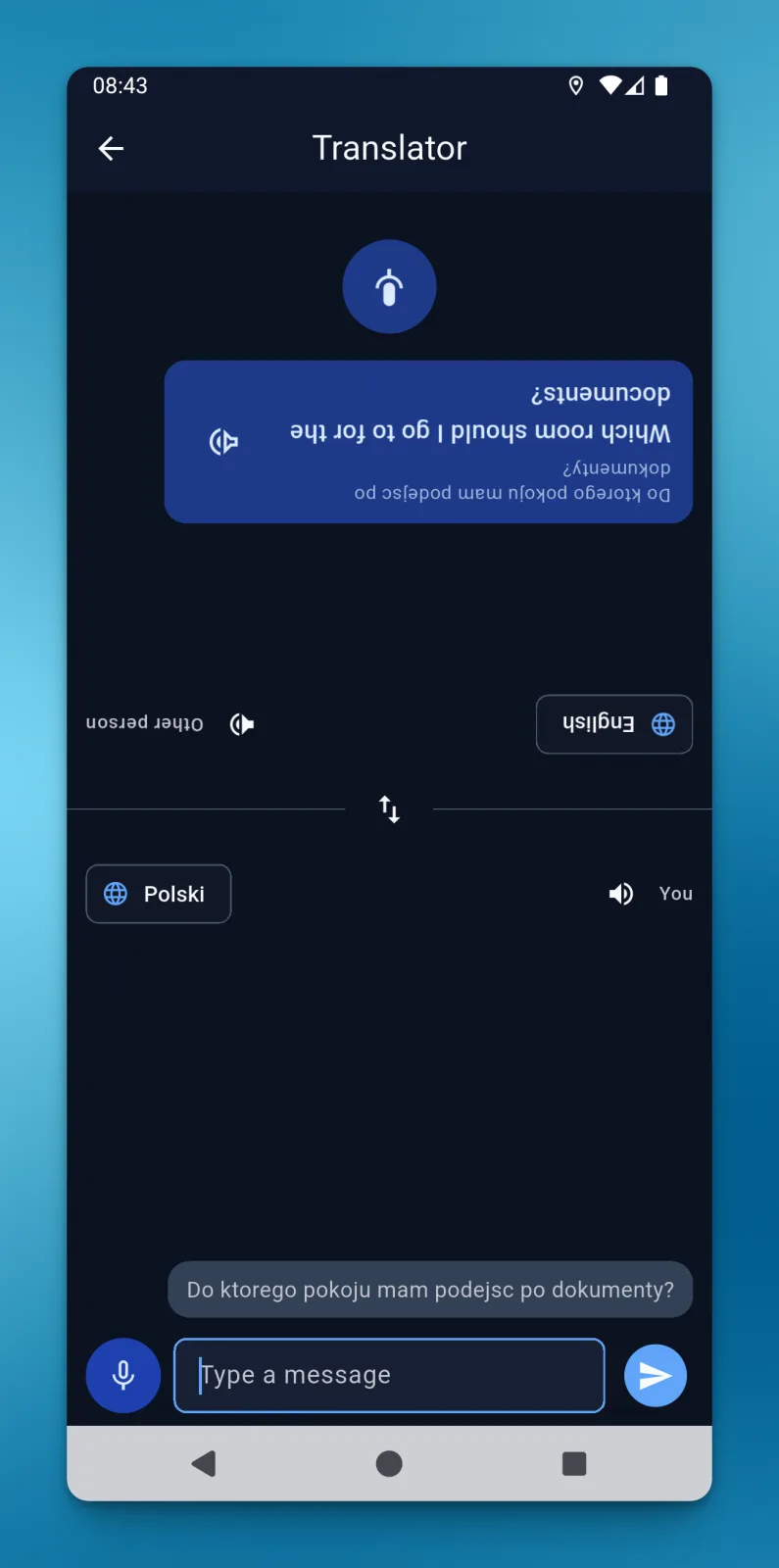
The translator in LiteTMS Mobile helps drivers talk to warehouse staff when they don't share a language. Drivers can type or record a message, and the translation appears on the other person's half of the screen, rotated so they can read it from across the phone. Voice playback is also available when enabled for the driver.
Asking where to collect the paperwork
The screenshot shows a driver asking, in Polish, which room to go to for the documents. The person opposite sees the question in English. It's the kind of short conversation a driver needs to have before leaving a loading site.
We built the translator tab around that exchange. Choose a language for each person, then type and send a question or record it using the microphone. Once translated, the message appears on the recipient's side in their chosen language.
A screen you can read from both sides
The driver uses the bottom half of the screen. The top half faces the other person, rotated by 180 degrees.
That layout lets a phone stay on the counter between two people. The driver can use their controls while the warehouse worker reads the translation the right way up. There's no need to turn the phone around after every message.
The same layout keeps the reply within reach. The other person has a microphone on their half of the screen, so they can record an answer in their own language. Its translation then appears on the driver's side.
Listening to a translated message
When voice playback is enabled, the speaker button next to a translation reads it aloud in the recipient's language. Someone who would prefer to hear the question can listen to it while the text stays on screen.
Both people use the driver's phone throughout the conversation. The warehouse worker can read the translated question and reply using the microphone on the side facing them.
Starting a conversation in LiteTMS Mobile
Open the translator and select the two languages. Type and send a message, or use the microphone to record it. Position the phone between you so the other person can read the upper half and reach their microphone to answer.
The translator is a driver feature of LiteTMS Mobile, the company app for businesses that use LiteTMS. Access to the translator and voice playback depends on company settings and the driver's permissions.
Questions people ask
- Can a driver speak instead of typing a message?
- Yes. The translator in LiteTMS Mobile accepts typed text and recorded speech. The translation appears after the text is sent or the recording is processed.
- Do I need to turn the phone around to show a translation?
- No. The top half of the translator screen is rotated by 180 degrees for the person opposite the driver. The driver uses the bottom half.
- Can the translator read a message aloud?
- Yes, when voice playback is enabled for the driver. The speaker button next to a translation plays it in the recipient's language.
- How does the other person reply?
- They record a reply using the microphone on their half of the screen. The translation appears on the driver's half, so both people can use the same phone.
Keep in touch
Make room for better reads.
Choose LiteTMS as a preferred source to find more of our articles on Google.
Choose LiteTMS on GoogleConfirm your choice on Google · Opens in a new tab