Update, 28 September 2026: An earlier version of this article called the app offline-first and said location is never tracked in the background. Without signal, photos and signatures wait on the phone and reach the order only after the connection returns, and the app has a separate, optional tracking mode that can run in the background. We have corrected the article, clarified the costs, and now use the app's current name, LiteTMS Mobile.
LiteTMS orders now carry point tasks. A dispatcher attaches a task to any stop on the route, a photo of the cargo or a signature from the receiver, and the driver completes it in LiteTMS Mobile at that exact point. Once the phone sends them, the photos and the signature appear on the order, where the office can see them.
The dispute that has no evidence
Cargo damage claims rarely turn on what happened. They turn on what you can show. The goods left the warehouse in some condition, arrived in some condition, and everything between those two moments is somebody's word. The driver remembers the pallets were already cracked at loading. The receiver remembers differently. And the one photo that could settle it lives on a private phone, in a chat, if it was taken at all.
Most companies patch this with instructions: "always photograph the load", "get a signature on the paper copy". Instructions given in the morning have a way of evaporating by the third stop. The fix is not a stricter memo. The fix is putting the request where the work happens.
Tell the driver what proof you need, stop by stop
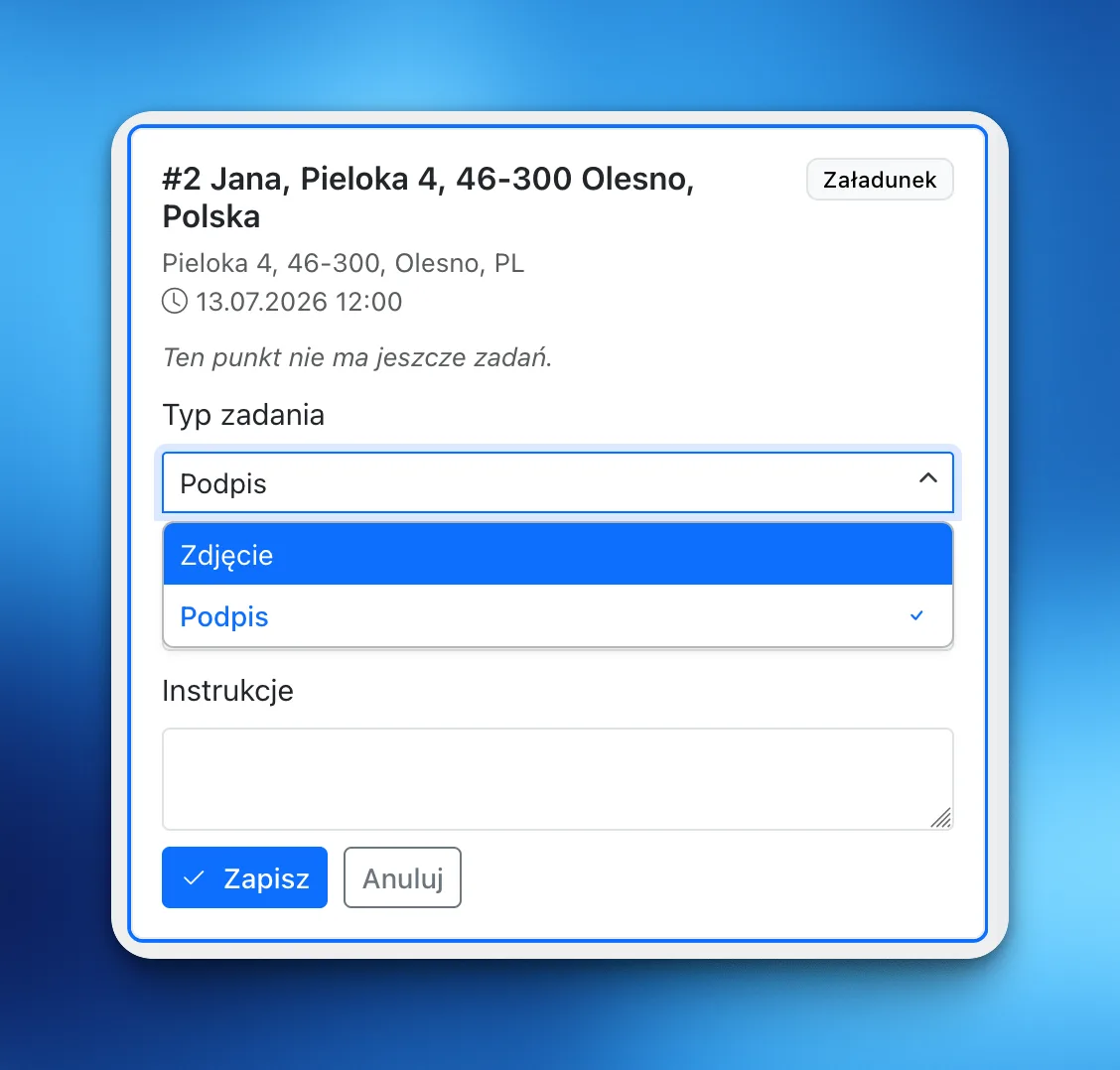
In the order workspace, every stop on the route now has its own task list. Open a loading or unloading point, add a task, and pick the type: photo or signature. You can give it a short title and written instructions, so "photo" becomes "photograph the seal and all four pallet corners before the doors close". Save, and the task is attached to that point, on that order, for that driver.
The point matters. A task pinned to stop #2 shows up when the driver is dealing with stop #2, not in a general checklist they scrolled past at six in the morning. If plans change, the office can edit or cancel a task from the same panel.
Photos and a signature, straight from the phone
On the road, the driver opens the order in LiteTMS Mobile and sees the pending tasks right on the stop. A photo task opens a camera flow built for a loading ramp: take several shots, review them, retake the bad ones, send. A signature task turns the phone into the clipboard. The driver hands it over, the receiver signs on the screen with a finger, done.
Everything the driver captures attaches to the task and goes to the order. A dead zone at the ramp doesn't stop the driver, as long as the order was already on the phone: the photos or the signature are saved on the device, the task shows them as waiting to send, and the app sends them once the signal returns. Until then they exist only on the phone, so the office sees the proof after it has been sent, not at the moment it was captured.
What the office sees
Each completed task shows up on the order with its photos or signature and the time it was completed. If location is allowed on the phone and a fix is available, the task also carries a one-time snapshot of where the phone was at that moment. Completing a task never switches on tracking. LiteTMS Mobile does have a separate, optional position-sharing mode that can run in the background, but only when the company allows it and the driver turns it on.
So when the claim call comes three weeks later, nobody digs through chat archives. The order holds the evidence, stamped and in place: this is what the cargo looked like at loading, this is who signed at delivery, this is when and where.
What it costs
A point task has no charge of its own. Point tasks are part of the orders workspace, LiteTMS Mobile has no separate app fee, and orders themselves are free and unlimited. The photos and signatures are stored as files, though, and file storage follows the pricing shown in the panel, as do your drivers' employee accounts.
Questions people ask
- What are point tasks in LiteTMS?
- Point tasks are small assignments a dispatcher attaches to a specific stop on an order: take photos of the cargo or collect a signature. The driver completes them in LiteTMS Mobile at that stop, and once the phone has sent the results, they appear on the order for the office to see.
- How does a driver collect a signature?
- The driver opens the task on the stop and hands the phone to the receiver, who signs directly on the screen. The signature is saved to the task and synced to the order.
- Does LiteTMS Mobile track the driver's location for tasks?
- Not continuously. When a task is completed, the app adds a one-time snapshot of the position at that moment, if one is available, tied to that work event. Background tracking is a separate, optional mode that the company must allow and the driver must turn on; completing a task never starts it.
- Do point tasks work without mobile signal?
- Partly. If the order and its tasks are already on the phone, the driver can take the photos or collect the signature in a dead zone. They are saved on the phone and sent to the order after the connection returns, so the office sees them only then.
- Do point tasks cost extra?
- Not as tasks. They are part of the orders workspace, orders are free and unlimited, and LiteTMS Mobile has no separate app fee. The photos and signatures are stored as files, and storage follows the pricing shown in the panel.
Keep in touch
Make room for better reads.
Choose LiteTMS as a preferred source to find more of our articles on Google.
Choose LiteTMS on GoogleConfirm your choice on Google · Opens in a new tab